The main objective of these recommendation systems is to do following-
Customization or personalizaiton
Cross sell
Up sell
Customer retention
Address the “Long Tail” phenomenon seen in Online stores vs Brick and Mortar stores
etc..
There are three main approaches for building any recommendation system-
Collaborative Filtering–
Users and items matrix is built. Normally this matrix is sparse, i.e. most of the cells will be empty. The goal of any recommendation system is to find similarities among the users and items and recommend items which have high probability of being liked by a user given the similarities between users and items.
Similarities between users and items can be assessed using several similarity measures such as Correlation, Cosine Similarities, Jaccard Index, Hamming Distance. The most commonly used similarity measures are Cosine Similarity and Jaccard Index in a recommendation engine
Content Based-
This type of recommendation engine focuses on finding the characteristics, attributes, tags or features of the items and recommend other items which have some of the same features. Such as recommend another action movie to a viewer who likes action movies.
Hybrid-
These recommendation systems combine both of the above approaches.
Build Recommendation System in Python using ” Scikit – Surprise”-
Now let’s switch gears and see how we can build recommendation engines in Python using a special Python library called Surprise.
This library offers all the necessary tools such as different algorithms (SVD, kNN, Matrix Factorization), in built datasets, similarity modules (Cosine, MSD, Pearson), sampling and models evaluations modules.
Here is how you can get started
Step 1- Switch to Python 2.7 Kernel, I couldn’t make it work in 3.6 and hence needed to install 2.7 as well in my Jupyter notebook environment
Step 2- Make sure you have Visual C++ compilers installed on your system as this package requires Cython Wheels. Here are couple of links to help you in this effort
Please note that if you don’t do the Step 2 correctly, you will get errors such as shown below – ” Failed building wheel for Scikit-surprise” or ” Microsoft Visual C++ 14 is required”
Step 3- Install Scikit- Surprise. Please make sure that you have Numpy installed before this
pip install numpy
pip install scikit-surprise
Step 4- Import scikit-surprise and make sure it’s correctly loaded
Recommendation engines or systems are machine learning algorithms to make relevant recommendations about the products and services and they are all around us. Few common examples are-
Amazon- People who buy this also buy this or who viewed this also viewed this
Facebook- Friends recommendation
Linkedin- Jobs that match you or network recommendation or who viewed this profile also viewed this profile
The main objective of these recommendation systems is to do following-
Customization or personalizaiton
Cross sell
Up sell
Customer retention
Address the “Long Tail” phenomenon seen in Online stores vs Brick and Mortar stores
60% of video watch time on Youtube is driven by the recommendation engine.
-Google.com
How do we build a Recommendation Engine?
There are three main approaches for building any recommendation system-
Collaborative Filtering–
Users and items matrix is built. Normally this matrix is sparse, i.e. most of the cells will be empty and hence some sort of matrix factorization ( such as SVD) is used to reduce dimensions. More on matrix factorization will be discussed later in this article.
The goal of these recommendation system is to find similarities among the users and items and recommend items which have high probability of being liked by a user given the similarities between users and items.
Similarities between users and items embeddings can be assessed using several similarity measures such as Correlation, Cosine Similarities, Jaccard Index, Hamming Distance. The most commonly used similarity measures are dotproducts, Cosine Similarity and Jaccard Index in a recommendation engine
These algorithms don’t require any domain expertise (unlike Content Based models) as it requires only a user and item matrix and related ratings/feedback and hence these algorithms can make a recommendation about an item to a user as long it can identify similar users and item in the matrix .
The flip side of these algorithms is that they may not be suitable for making recommendations about a new item that was not there in the user / item matrix on which the model was trained.
Content Based-
This type of recommendation engine focuses on finding characteristics, attributes, tags or features of the items and recommend other items which have some of the same features. Such as, recommend another action movie to a viewer who likes action movies.
Since this algorithm uses features of a product or service to make recommendations, this offers advantage of referring unique or niche items and can be scaled to make recommendations for a wide array of users. On the other hand, defining product features accurately will be key to success of these algorithms.
Hybrid-
These recommendation systems combine both of the above approaches.
Build Recommendation System in Python using ” Scikit – Surprise”-
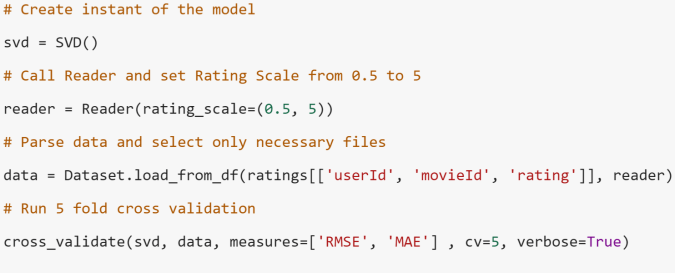
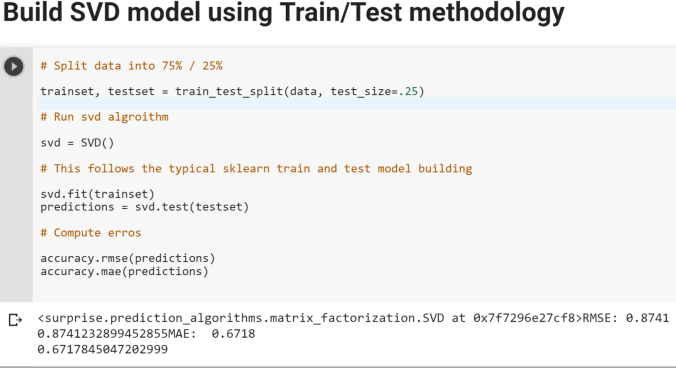
Now let’s switch gears and see how we can build recommendation engines in Python using a special Python library called Surprise. In this exercise, we will build a Collaborative Filtering algorithm using Singular Value Decomposition (SVD) for dimension reduction of a large User-Item Sparse matrix to provide more robust recommendations while avoiding computational complexity.
Here is how you can get started
Step 1- Please make sure that Anaconda and other packages such as Numpy are up to date
Step 2- Make sure you have Visual C++ compilers installed on your system as this package requires Cython Wheels. Here are couple of links to help you in this effort
Please note that if you don’t do the Step 2 correctly, you will get errors such as shown below – ” Failed building wheel for Scikit-surprise” or ” Microsoft Visual C++ 14 is required”
Step 3- Install Scikit- Surprise. Please make sure that you have Numpy installed before this
pip install numpy
pip install scikit-surprise
Step 4- Import scikit-surprise and make sure it’s correctly loaded
For sake of simplicity, you can also use Google Colab to work on the below example-
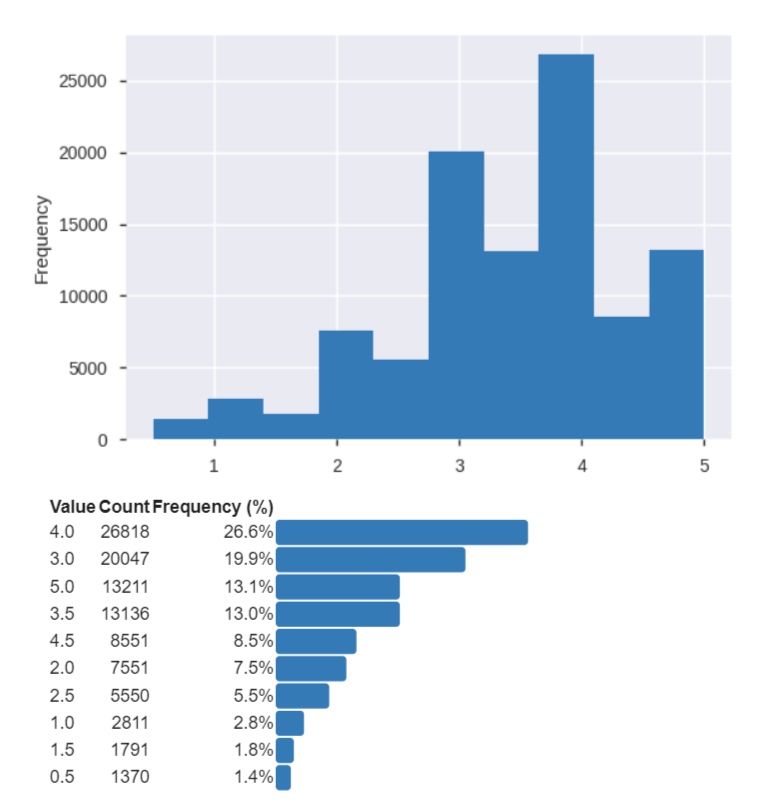
Let’s import Movielens small dataset for the purpose of building couple of Recommendation Engines using KNN and SVD algorithms. Please note the that the Surprise package offers many- many more algorithms to choose from. Data can be found at the link-https://grouplens.org/datasets/movielens/
Download the zip files and you will see the following files that you can import in Python to explore. However, for the purpose of CF models, we only need the ratings.csv file.
Here are some key steps that we will follow to build Recommendation Engine for this data
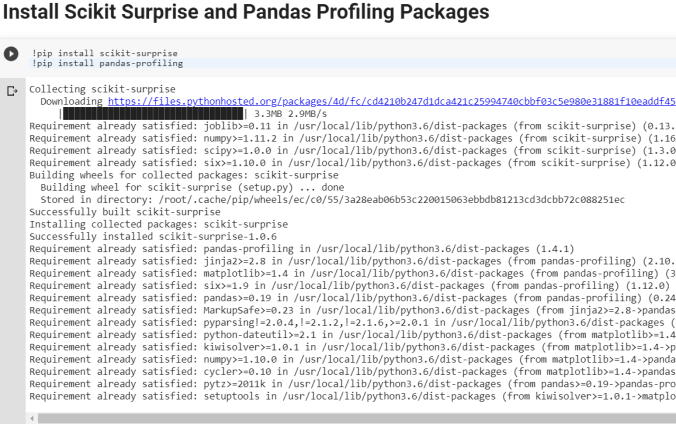
Install Scikit Surprise and Pandas Profiling Packages
Import necessary packages
Type Magic command to print multiple statements on a same line
Logistic regression is a supervised machine learning algorithm used for binary classification — predicting whether an outcome belongs to one of two classes (e.g., survived / did not survive, spam / not spam, fraud / not fraud).
Unlike linear regression, which predicts a continuous value, logistic regression predicts a probability that an observation belongs to the positive class. That probability is then converted into a class label using a decision threshold (typically 0.5).
Use Cases
Logistic regression is widely used when the target is binary or can be treated as binary:
Domain
Example
Healthcare
Disease diagnosis (positive / negative test result)
In this notebook, we use logistic regression to predict whether a Titanic passenger survived (1) or not (0) based on features such as age, gender, fare, and passenger class.
The Model Equation
Logistic regression starts with a linear combination of features (similar to linear regression):
z = β₀ + β₁x₁ + β₂x₂ + … + βₙxₙ
This value z is passed through the sigmoid (logistic) function to produce a probability between 0 and 1:
P(y = 1 | x) = σ(z) = 1 / (1 + e^(-z))
Where:
P(y=1 | x) = probability of the positive class
β₀ = intercept (bias term)
β₁, β₂, …, βₙ = coefficients (weights) for each feature
x₁, x₂, …, xₙ = input feature values
The sigmoid function squashes any real number into the range (0, 1), making it ideal for probability estimation.
Log-Odds (Logit)
Instead of modeling probability directly, logistic regression can be understood as modeling the log-odds (also called the logit) of the outcome:
p / (1-p) = odds (ratio of probability of success to probability of failure)
ln(p / (1-p)) = log-odds or logit
Key insight: The logit transforms a probability (bounded 0–1) into an unbounded real number, allowing us to use a linear model. A one-unit increase in a feature changes the log-odds by that feature’s coefficient βⱼ.
Example: If β_gender = 1.5, being in the coded “female” category increases the log-odds of survival by 1.5 — which corresponds to multiplying the odds by e^1.5 ≈ 4.48.
Algorithm & Optimization
Logistic regression learns the coefficients β₀, β₁, …, βₙ by maximizing the likelihood of observing the actual training labels — equivalent to minimizing the log-loss (cross-entropy loss):
predict_proba() returns the raw probabilities, which we use later in this notebook for threshold optimization and detailed prediction analysis.
Logistic Regression vs. Linear Regression
Logistic Regression vs. Linear Regression
Aspect
Linear Regression
Logistic Regression
Output
Continuous value
Probability (0 to 1)
Link function
Identity
Sigmoid (logit)
Loss function
Mean Squared Error
Log-loss (cross-entropy)
Use case
Predicting quantities
Binary classification
Strengths & Limitations
Strengths:
Simple, fast, and highly interpretable
Outputs well-calibrated probabilities
Works well as a baseline classifier
Less prone to overfitting with small datasets (with regularization)
Limitations:
Assumes a linear decision boundary in log-odds space
Struggles with complex non-linear relationships
Sensitive to feature scaling (we apply StandardScaler in this notebook)
Requires thoughtful handling of missing values and categorical encoding
CODES
# ============================================================================= # IMPORTS AND ENVIRONMENT SETUP # ============================================================================= # Import core libraries for numerics, data handling, and plotting import numpy as np import pandas as pd from matplotlib import pyplot as plt import seaborn as sns #import pandas_profiling %matplotlib inline !pip install tqdm
# Enable multiple expressions per cell in Jupyter (shows all results, not just last) from IPython.core.interactiveshell import InteractiveShell InteractiveShell.ast_node_interactivity = “all”
# ============================================================================= # EXPLORATORY DATA ANALYSIS — Titanic Dataset Overview # ============================================================================= # Load a fresh copy of the Titanic dataset for initial exploration titanic_eda = sns.load_dataset(‘titanic’)
# — Dataset shape and basic statistics — print(“=” * 60) print(“TITANIC DATASET — EXPLORATORY DATA ANALYSIS”) print(“=” * 60) print(f”\nDataset Shape: {titanic_eda.shape[0]} rows x {titanic_eda.shape[1]} columns”) print(f”Overall Survival Rate: {titanic_eda[‘survived’].mean():.1%}”) print(“\n— Missing Values —“) print(titanic_eda.isna().sum()) print(“\n— Survival by Gender —“) print(titanic_eda.groupby(‘sex’)[‘survived’].mean().round(3)) print(“\n— Survival by Passenger Class —“) print(titanic_eda.groupby(‘pclass’)[‘survived’].mean().round(3))
# ============================================================================= # LOAD TITANIC DATA # ============================================================================= # Load the built-in Titanic dataset from seaborn and preview first/last rows titanic = sns.load_dataset(‘titanic’) titanic.head() titanic.tail()
# ============================================================================= # PROGRESS BAR DEMO (tqdm) # ============================================================================= # Demonstrate tqdm progress bar utility from tqdm import tqdm from time import sleep with tqdm(total=100) as pbar: for i in range(10): sleep(0.1) pbar.update(10)
# ============================================================================= # DROP REDUNDANT / LEAKAGE COLUMNS # ============================================================================= # Remove columns that duplicate information or would leak the target variable # Note: ‘deck’ is kept here because it is imputed later in the missing-value section titanic.drop([‘alive’, ‘class’,’who’, ’embark_town’, ‘alone’, ‘adult_male’] ,axis=1,inplace=True)
# Preview cleaned dataframe titanic.head()
# Check data types and non-null counts titanic.info()
# Explore embarked port distribution before handling missing values titanic[’embarked’].value_counts()
# Find the most frequent embarkation port (used for imputation) titanic[’embarked’].mode()
# Inspect rows with missing embarked values titanic.iloc[[61,684],:]
titanic.info()
# Fill missing embarked values with the mode (most common port: Southampton) titanic[’embarked’] = titanic[’embarked’].fillna(titanic[’embarked’].mode()[0])
titanic.info()
# Summary of remaining missing values across all columns titanic.isna().sum()
# ============================================================================= # DECK COLUMN — MISSING VALUE TREATMENT # ============================================================================= # Convert deck to object type and fill missing deck values with ‘Not Assigned’ # (Must run before categorical encoding so deck is not dropped and median fill works) titanic.deck = titanic.deck.astype(‘object’)
# ============================================================================= # ENCODE CATEGORICAL VARIABLES AS INTEGER CODES # ============================================================================= # Convert object-type columns to numeric category codes for modeling for x in titanic.columns: if titanic[x].dtype == “object”: titanic[x]=pd.Categorical(titanic[x]).codes
titanic.head()
# ============================================================================= # IMPUTE MISSING AGE WITH MEDIAN # ============================================================================= # Compute median age and fill missing age values titanic[‘age’].median()
# Sample and inspect the cleaned dataset titanic.head(10) titanic.sample(10) titanic.tail(10) titanic.info()
titanic.columns
titanic.info()
# ============================================================================= # DESCRIPTIVE STATISTICS AND OUTLIER ANALYSIS # ============================================================================= # Summary statistics for all numeric columns titanic.describe()
# Percentile distribution to identify potential outliers titanic.quantile((0, 0.01,0.05, 0.5, 0.95,0.99, 1.0))
# Visualize fare distribution before clipping outliers titanic.fare.hist()
# Clip fare outliers at the 99th percentile upper bound titanic.fare = np.clip(titanic.fare,0,249.00622 )
titanic.fare.describe()
titanic.fare.hist()
titanic.info()
titanic.describe()
# Clip all numeric columns to their 1st and 99th percentile bounds for x in titanic.columns: outlier = titanic[x].quantile([0.01,0.99]).values titanic[x] = np.clip(titanic[x], outlier[0], outlier[1])
titanic.describe()
# prompt: read a csv file
#df = pd.read_csv(‘filename.csv’)
titanic.describe() titanic.head()
# Check class balance of the target variable (survived) titanic.groupby(‘survived’).size()
titanic.shape
# ============================================================================= # PREPARE FEATURES (X) AND TARGET (y) # ============================================================================= # Import scikit-learn modules for splitting, metrics, and logistic regression from sklearn.model_selection import train_test_split from sklearn import metrics from sklearn.linear_model import LogisticRegression
# Separate features from target variable x = titanic.drop([‘survived’], axis = 1, inplace=False) y = titanic[‘survived’] x.shape print(‘\n’) y.shape
# ============================================================================= # TRAIN / TEST SPLIT # ============================================================================= # Split in Train and Test data x_train, x_test, y_train, y_test = train_test_split(scld_titanic_df, y, test_size=0.2, random_state=999) x_train.shape y_train.shape x_test.shape y_test.shape
x_train y_train x_test
# Check survival rate (% positive class) in train and test sets np.round(y_train.sum()/y_train.count()*100,2) print(‘\n’) np.round(y_test.sum()/y_test.count()*100,2)
# Fit the model on training data log.fit(x_train, y_train)
# ============================================================================= # PREDICTIONS AND EVALUATION # ============================================================================= # Generate class predictions on the test set predicted = log.predict(x_test) predicted
from sklearn import metrics print((metrics.classification_report(y_test, predicted)))
# Build confusion matrix comparing actual vs predicted labels df_confusion = metrics.confusion_matrix(y_test,predicted) df_confusion
import seaborn as sns import matplotlib.pyplot as plt # Visualize confusion matrix as a heatmap sns.heatmap(df_confusion, cmap = ‘Greens’,xticklabels=[‘Prediction No’,’Prediction Yes’], yticklabels=[‘Actual No’,’Actual Yes’], annot=True, fmt=’d’) plt.show();
# ============================================================================= # MODEL INTERPRETATION — COEFFICIENTS # ============================================================================= # Raw model coefficients (log-odds impact of each feature) log.coef_
x.columns
# Combine feature names with their coefficients for readability coeff = pd.concat([pd.DataFrame(x.columns), pd.DataFrame(np.transpose(log.coef_))],axis =1 ) coeff.columns = (“Variable”, ‘Coeff’)
coeff
# ============================================================================= # PROBABILITY PREDICTIONS AND THRESHOLD ANALYSIS # ============================================================================= # Find out probability of the classes and predicted classes predicted_prob = log.predict_proba(x_test) predicted_prob_df = pd.DataFrame(predicted_prob) predicted_classes_df = pd.DataFrame(predicted) y_actual_df = pd.DataFrame(y_test.values) predicted_df = pd.concat([predicted_prob_df, predicted_classes_df, y_actual_df], axis=1) predicted_df.columns = [‘Prob_0′,’Prob_1′,’Predicted_Class’, ‘Actual_Class’] predicted_df.sample(20)
predicted_prob
Output Block
Requirement already satisfied: tqdm in /usr/local/lib/python3.12/dist-packages (4.67.3) ============================================================ TITANIC DATASET — EXPLORATORY DATA ANALYSIS ============================================================
— Missing Values — survived 0 pclass 0 sex 0 age 177 sibsp 0 parch 0 fare 0 embarked 2 class 0 who 0 adult_male 0 deck 688 embark_town 2 alive 0 alone 0 dtype: int64
— Survival by Gender — sex female 0.742 male 0.189 Name: survived, dtype: float64
— Survival by Passenger Class — pclass 1 0.630 2 0.473 3 0.242 Name: survived, dtype: float64 /tmp/ipykernel_597/1527970602.py:40: FutureWarning:
Passing `palette` without assigning `hue` is deprecated and will be removed in v0.14.0. Assign the `x` variable to `hue` and set `legend=False` for the same effect.
Passing `palette` without assigning `hue` is deprecated and will be removed in v0.14.0. Assign the `x` variable to `hue` and set `legend=False` for the same effect.
Requirement already satisfied: tqdm in /usr/local/lib/python3.12/dist-packages (4.67.3)
============================================================
TITANIC DATASET — EXPLORATORY DATA ANALYSIS
============================================================

Dataset Shape: 891 rows x 15 columns
Overall Survival Rate: 38.4%

--- Missing Values ---
survived         0
pclass           0
sex              0
age            177
sibsp            0
parch            0
fare             0
embarked         2
class            0
who              0
adult_male       0
deck           688
embark_town      2
alive            0
alone            0
dtype: int64

--- Survival by Gender ---
sex
female    0.742
male      0.189
Name: survived, dtype: float64

--- Survival by Passenger Class ---
pclass
1    0.630
2    0.473
3    0.242
Name: survived, dtype: float64
/tmp/ipykernel_597/1527970602.py:40: FutureWarning:

Passing `palette` without assigning `hue` is deprecated and will be removed in v0.14.0. Assign the `x` variable to `hue` and set `legend=False` for the same effect.

  sns.countplot(data=titanic_eda, x='survived', ax=axes[0, 0], palette='Set2')
/tmp/ipykernel_597/1527970602.py:63: FutureWarning:

Passing `palette` without assigning `hue` is deprecated and will be removed in v0.14.0. Assign the `x` variable to `hue` and set `legend=False` for the same effect.

  sns.boxplot(data=titanic_eda, x='survived', y='fare', ax=axes[0], palette='Pastel1')
/tmp/ipykernel_597/2760321974.py:2: FutureWarning:

Passing `palette` without assigning `hue` is deprecated and will be removed in v0.14.0. Assign the `x` variable to `hue` and set `legend=False` for the same effect.

  sns.barplot(x='Variable', y='Coeff', data=coeff, palette='viridis')
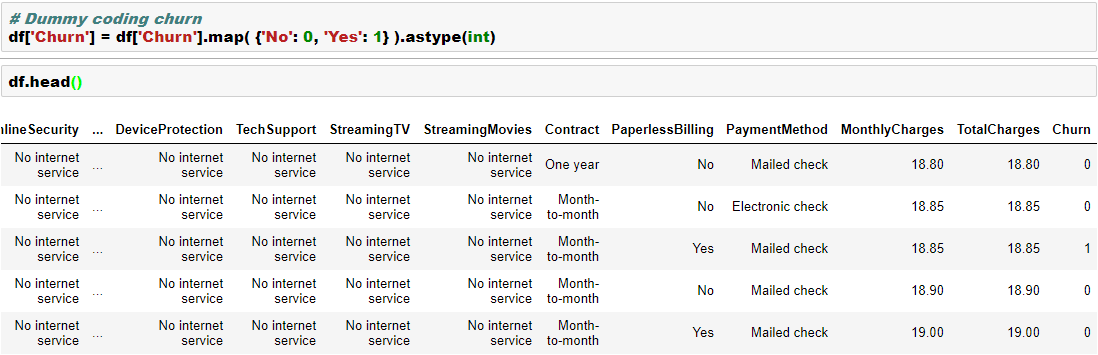
Converting categorical variables into numerical dummy coded variable is generally a requirement in machine learning libraries such as Scikit as they mostly work on numpy arrays.
In this blog, let’s look at how we can convert bunch of categorical variables into numerical dummy coded variables using four different methods-
Scikit learn preprocessing LabelEncoder
Pandas getdummies
Looping
Mapping
We will work with a dataset from IBM Watson blog as this has plenty of categorical variables. You can find the data here. In this data, we are trying to build a model to predict “churn”, which has two levels “Yes” and “No”.
We will convert the dependent variable using Scikit LabelEncoder and the independent categorical variables using Pandas getdummies. Please note that LabelEncoder will not necessarily create additional columns, whereas the getdummies will create additional columns in the data. We will see that in the below example-
Here are few other ways to dummy coding-
Here is an excellent Kaggle Kernel for detailed feature engineering.
Overview: KMeans is an unsupervised machine learning algorithm used to partition data into a specified number of clusters (k). Each cluster is defined by its centroid, and the algorithm aims to minimize the distance between data points and their assigned cluster centroids.
Core Concepts:
Clusters and Centroids:
A cluster is a group of data points that are similar to each other.
The centroid is the mean position of all the points in a cluster.
Assignment and Update Steps:
Assignment: Each data point is assigned to the nearest centroid.
Update: The centroids are recalculated as the mean of all points assigned to each cluster.
Iterative Optimization:
The assignment and update steps are repeated until the centroids no longer change significantly or a maximum number of iterations is reached.
Assumptions:
The number of clusters (k) is known and fixed in advance.
Clusters are roughly spherical and equally sized.
Data points are closer to their own cluster centroid than to others.
The algorithm is sensitive to the initial placement of centroids.
Key Equations:
Distance Calculation:
The most common distance metric is Euclidean distance.
For a data point x and centroid c: Distance = sqrt( (x1 – c1)^2 + (x2 – c2)^2 + … + (xn – cn)^2 )
Centroid Update:
For each cluster, the new centroid is the mean of all points assigned to that cluster.
Centroid for cluster j: cj = (1 / Nj) * sum(xi) where Nj is the number of points in cluster j, and xi are the points in cluster j.
Objective Function (Inertia):
KMeans minimizes the sum of squared distances (inertia) between each point and its assigned centroid.
Inertia = sum over all clusters j [ sum over all points i in cluster j (distance(xi, cj))^2 ]
Algorithm Steps:
Choose k initial centroids (randomly or using a method like k-means++).
Assign each data point to the nearest centroid.
Recalculate centroids as the mean of assigned points.
Repeat steps 2 and 3 until centroids stabilize.
Limitations:
Sensitive to outliers and noise.
May converge to a local minimum (results can vary with different initializations).
Not suitable for clusters with non-spherical shapes or very different sizes.
Applications:
Market segmentation
Image compression
Document clustering
Anomaly detection
# Simple KMeans Clustering Example
import numpy as np
import matplotlib.pyplot as plt
from sklearn.datasets import make_blobs
from sklearn.cluster import KMeans
from sklearn.metrics import silhouette_score

# Generate synthetic data
X, y_true = make_blobs(n_samples=300, centers=4, cluster_std=0.60, random_state=42)

# Elbow method to find optimal k
inertia = []
k_range = range(1, 11)
for k in k_range:
    kmeans = KMeans(n_clusters=k, random_state=42)
    kmeans.fit(X)
    inertia.append(kmeans.inertia_)
plt.figure(figsize=(6,4))
plt.plot(k_range, inertia, 'bo-')
plt.axvline(x=4, color='red', linestyle='--', label='Optimal k=4')
plt.xlabel('Number of clusters (k)')
plt.ylabel('Inertia')
plt.title('Elbow Method for Optimal k')
plt.legend()
plt.grid(True)
plt.show()

# Fit KMeans with optimal k (choose visually, e.g., k=4)
k_opt = 4
kmeans = KMeans(n_clusters=k_opt, random_state=42)
labels = kmeans.fit_predict(X)

# Plot clusters
plt.figure(figsize=(7,5))
plt.scatter(X[:, 0], X[:, 1], c=labels, cmap='viridis', s=50)
plt.scatter(kmeans.cluster_centers_[:, 0], kmeans.cluster_centers_[:, 1], c='red', s=200, alpha=0.75, marker='X', label='Centers')
plt.title(f'KMeans Clustering (k={k_opt})')
plt.xlabel('Feature 1')
plt.ylabel('Feature 2')
plt.legend()
plt.show()

# Silhouette score
score = silhouette_score(X, labels)
print(f'Silhouette Score (k={k_opt}): {score:.3f}')
Silhouette Score (k=4): 0.876
# KMeans Clustering on Iris Dataset
import numpy as np
import matplotlib.pyplot as plt
from sklearn.datasets import load_iris
from sklearn.cluster import KMeans
from sklearn.metrics import silhouette_score
import pandas as pd

# Load Iris data
iris = load_iris()
X = iris.data

# Elbow method to find optimal k
inertia = []
k_range = range(1, 11)
for k in k_range:
    kmeans = KMeans(n_clusters=k, random_state=42)
    kmeans.fit(X)
    inertia.append(kmeans.inertia_)
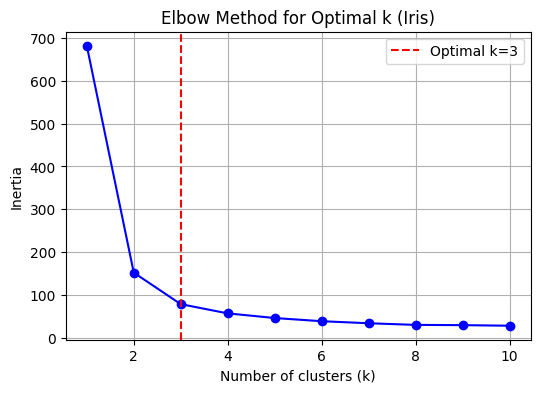
k_opt = 3  # Set optimal k explicitly for Iris data
plt.figure(figsize=(6,4))
plt.plot(k_range, inertia, 'bo-')
plt.axvline(x=k_opt, color='red', linestyle='--', label='Optimal k=3')
plt.xlabel('Number of clusters (k)')
plt.ylabel('Inertia')
plt.title('Elbow Method for Optimal k (Iris)')
plt.legend()
plt.grid(True)
plt.show()

# Fit KMeans with optimal k (choose visually, e.g., k=3)
kmeans = KMeans(n_clusters=k_opt, random_state=42)
labels = kmeans.fit_predict(X)

# Plot clusters (using first two features for visualization)
plt.figure(figsize=(7,5))
plt.scatter(X[:, 0], X[:, 1], c=labels, cmap='viridis', s=50)
plt.scatter(kmeans.cluster_centers_[:, 0], kmeans.cluster_centers_[:, 1], c='red', s=200, alpha=0.75, marker='X', label='Centers')
plt.title(f'Iris KMeans Clustering (k={k_opt})')
plt.xlabel(iris.feature_names[0])
plt.ylabel(iris.feature_names[1])
plt.legend()
plt.show()

# Plot clusters (using petal length and petal width for visualization)
plt.figure(figsize=(7,5))
plt.scatter(X[:, 2], X[:, 3], c=labels, cmap='viridis', s=50)
plt.scatter(kmeans.cluster_centers_[:, 2], kmeans.cluster_centers_[:, 3], c='red', s=200, alpha=0.75, marker='X', label='Centers')
plt.title(f'Iris KMeans Clustering (k={k_opt}) - Petal Length vs Petal Width')
plt.xlabel(iris.feature_names[2])
plt.ylabel(iris.feature_names[3])
plt.legend()
plt.show()

# Silhouette score
score = silhouette_score(X, labels)
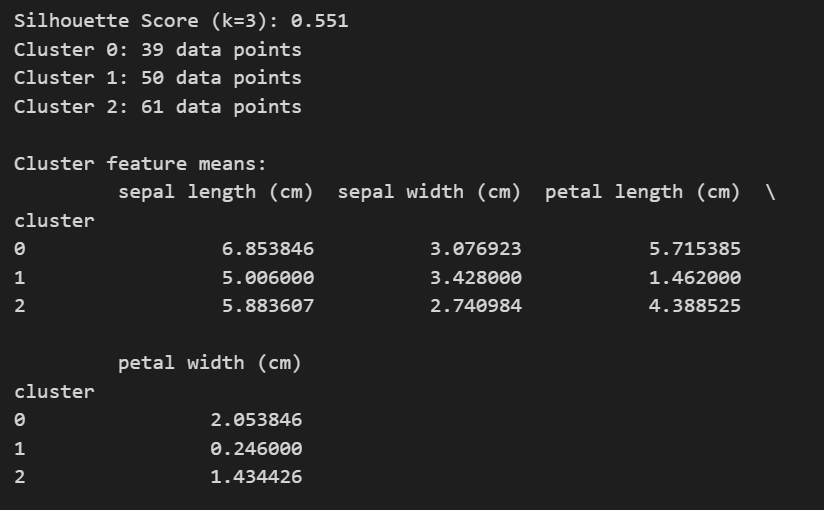
print(f'Silhouette Score (k={k_opt}): {score:.3f}')

# Number of observations in each cluster
unique, counts = np.unique(labels, return_counts=True)
for i, count in zip(unique, counts):
    print(f"Cluster {i}: {count} data points")

# Descriptive summary of each cluster (mean feature values)
df = pd.DataFrame(X, columns=iris.feature_names)
df['cluster'] = labels
print("\nCluster feature means:")
print(df.groupby('cluster').mean())
Linear regression is one of the most powerful and yet very simple machine learning algorithm. Linear regression is used for cases where the relationship between the dependent and one or more of the independent variables is supposed to be linearly correlated in the following fashion-
Y = b0 + b1*X1 + b2*X2 + b3*X3 + …..
Here Y is the dependent variable and X1, X2, X3 etc are independent variables. The purpose of building a linear regression model is to estimate the coefficients b0, b1, b2 et cetera that provides the least error rate in the prediction. More on the error will be discussed later in this article.
In the above equation, b0 is the intercept, b1 is the coefficient for variable X1, b2 is the coefficient for the variable X2 and so on…
What is a “Simple Linear Regression” and “ Multiple Linear Regression”?
When we have only one independent variable, resulting regression is called a “Simple Linear Regression” when we have 2 or more independent variables the resulting regression is called “Multiple Linear Regression”
What are the requirements for the dependent and independent variables in the regression analysis?
The dependent variable in linear regression is generally Numerical and Continuous such as sales in dollars, gdp, unemployment rate, pollution level, amount of rainfall etc. On the other hand, the independent variables can be either numeric or categorical. However, please note that the categorical variables will need to be dummy coded before we can use these variables for building a regression model in the sklearn library of Python.
What are some of the real world usage of linear regression?
As we discussed earlier, this is one of the most commonly used algorithm in ML. Some of the use cases are listed below-
Example 1-
Predict sales amount of a car company as a function of the # of models, new models, price, discount,GDP, interest rate, unemployment rate, competitive prices etc.
Example 2-
Predict weight gain/loss of a person as a function of calories intake, junk food, genetics, exercise time and intensity, sleep, festival time, diet plans, medicines etc.
Example 3-
Predict house prices as a function of sqft, # of rooms, interest rate, parking, pollution level, distance from city center, population mix etc.
Example 4-
Predict GDP growth rate as a function of inflation, unemployment rate, investment, new business, weather pattern, resources, population
How do we evaluate linear regression model’s performance?
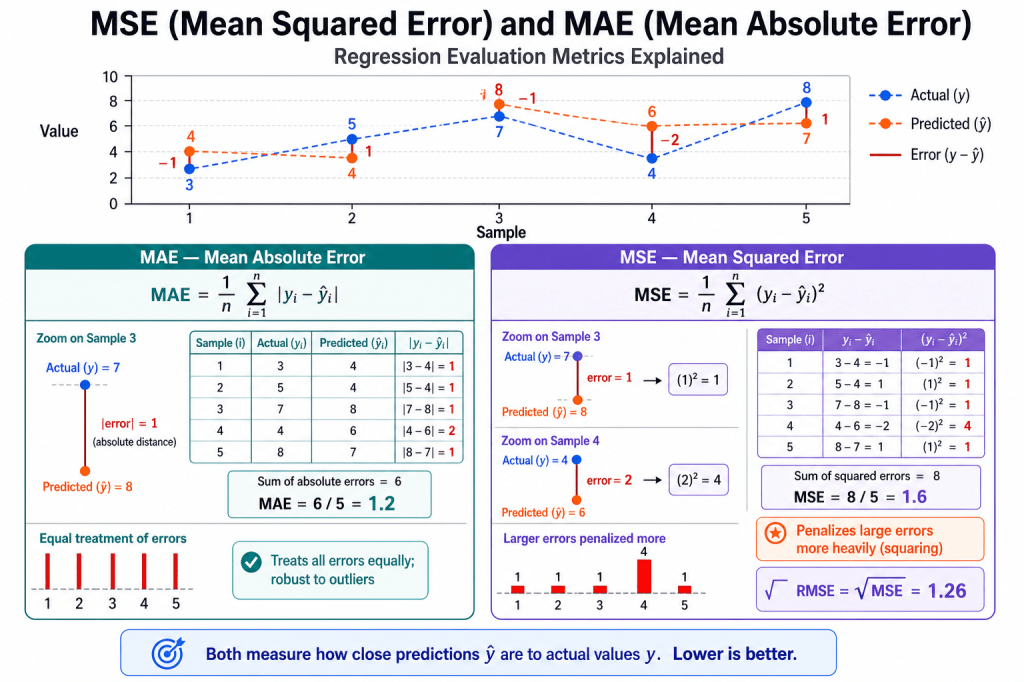
There are many metrics that can be used to evaluate a linear regression model’s performance and choose the best model. Some of the most commonly used metrics are-
Mean Square Error (MSE)- This is an error and lower the amount the better it is. It is defined using the below formula
R Square– This is called coefficient of determination and provides a gauge of model’s explaining power. For example, for a linear regression model with a RSquare of 0.70 or 70% would imply that 70% of the variation in the dependent variable can be explained by the model that has been built.
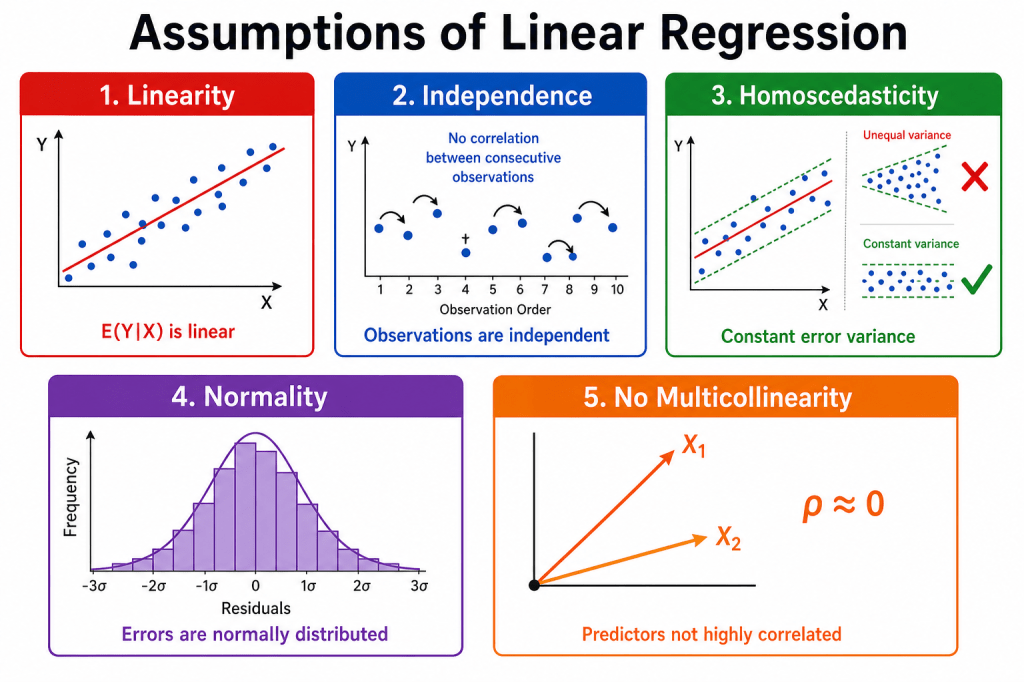
Assumptions of Linear Regression
The five assumptions
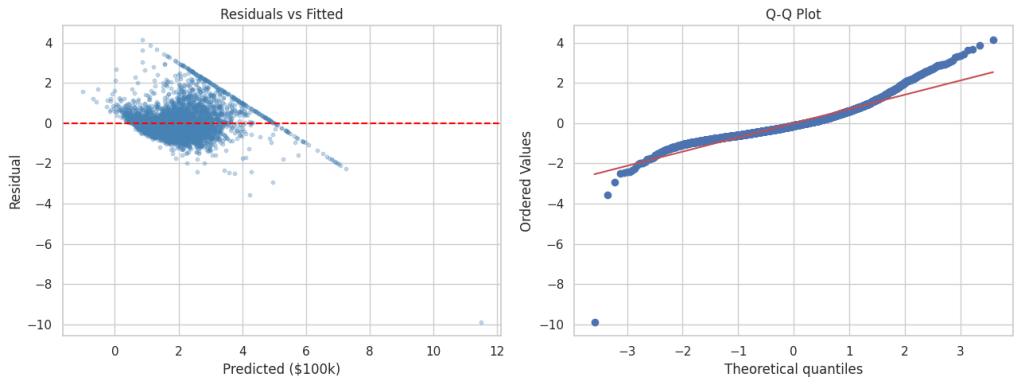
1. Linearity — E(Y|X) should follow a straight line, not a curve. Check with scatter plots and residual vs. fitted plots. Fix with transforms, polynomial terms, or nonlinear models.
2. Independence — Errors should not correlate across observations (common in time series or repeated measures). Check with Durbin–Watson or residuals vs. order. Fix with GLS, mixed models, or cluster-robust standard errors.
3. Homoscedasticity — Residual spread should stay constant across X. A funnel shape in the residual plot is a red flag. Fix with robust standard errors, WLS, or log transforms.
4. Normality — Residuals should be roughly bell-shaped. Matters most for small samples; large samples are often more forgiving. Check with Q–Q plots.
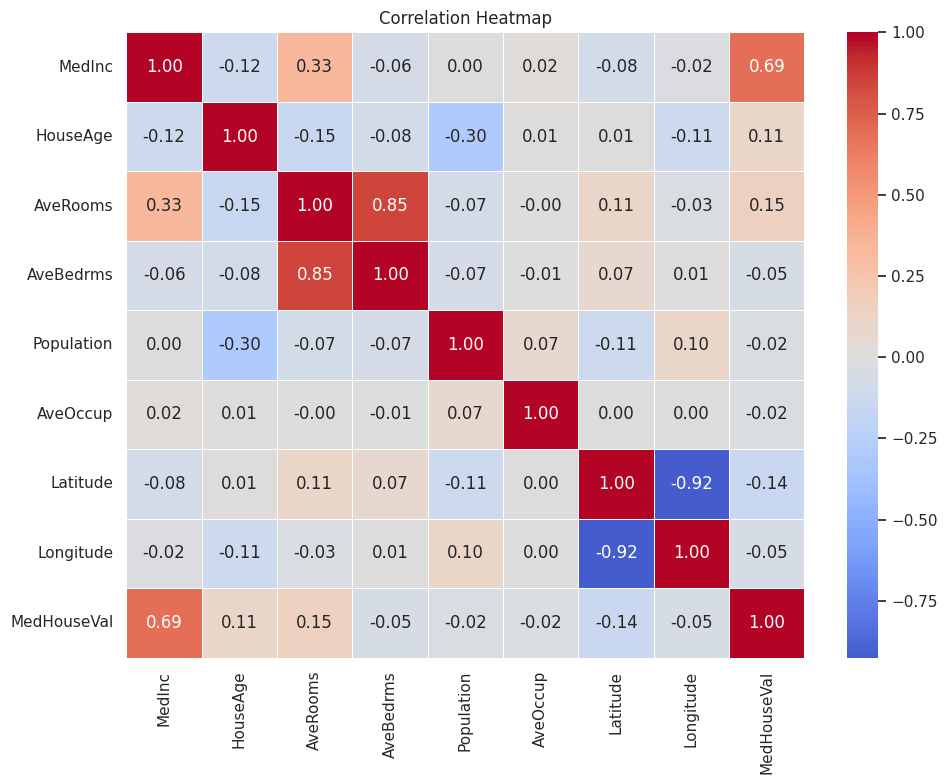
5. No multicollinearity — Predictors should not be almost redundant. High VIF can make individual coefficients unstable even when overall prediction is fine. Fix by dropping or combining predictors, or using ridge regression.
How do we build a linear regression model in Python?
In this exercise, we will build a linear regression model on Boston housing data set which is an inbuilt data in the scikit-learn library of Python. However, before we go down the path of building a model, let’s talk about some of the basic steps in any machine learning model in Python
In most cases, any of the machine learning algorithm in sklearn library will follow the following steps-
Split original data into features and label. In other words, create dependent variable and set of independent variables in two different arrays separately. Please note this requirement exists only for the supervised learning ( where a dependent variable is present). For unsupervised learning, we don’t have a dependent variable and hence there is no need to split the data into features and label
Scale or Normalize the features and label data. Please note that this is not a necessity for all algorithms and/or datasets. Also we are assuming that all the data cleaning and feature engineering such as missing value treatment, outlier treatment, bogus values fixes and dummy coding of the categorical variables have been done before doing this step
Create training and test data sets from the original data. Training data set will be used for training the model whereas the test data set will be used for validating the accuracy or the prediction power of the model on a new dataset. We would need to split both the features and labels into the training and the test split.
Create an instance of the model object that will be used for the modelling exercise. This process is called “Instantiation”. In simpler words, during this process we are loading the model package necessary to build a model.
“Fit” the model instance on the training data. During this step, the model is leveraging both the features and the label information provided in the training data to connect the features to label. Please note that we are going with all the default option during fitting of the model. As you get more expertise you may want to play with some parameter optimization, however we are just going with the defaults for now.
“Predict” using the model instance on test data. During this step, the model is only using the features information to predict the label.
Based on the predictions generated on the test data, we generate key performance indicators of model performance. This generally includes metrics such as Precision, Recall F score, Confusion Matrix, Accuracy, Mean Square Error (MSE), Root Mean Square Error (RMSE), Mean Absolute Error (MAE), Area Under the Curve (AUC), Mean Absolute Percentage error (MAPE) etc.
Once the model performance is evaluated and its deemed to be satisfactory for the purpose of the business uses, we implement the model for new unseen data
So let’s get started with building this model-
Overview
The dataset has 20,640 rows — one row per census block group in California (1990 U.S. Census). The goal is to predict median house value in a block from local demographic and housing features.
Target variable
Column
Description
MedHouseVal
Median house value in the block group, in $100,000 units (e.g. 2.5 ≈ $250,000). Values are capped at 5.0 ($500,000).
Features (8 predictors)
Column
Description
MedInc
Median income in the block group
HouseAge
Median age of houses in the block group
AveRooms
Average number of rooms per household
AveBedrms
Average number of bedrooms per household
Population
Total population in the block group
AveOccup
Average number of household members
Latitude
Block group latitude
Longitude
Block group longitude
import warnings
import matplotlib.pyplot as plt
import numpy as np
import pandas as pd
import seaborn as sns
from scipy import stats
from sklearn.datasets import fetch_california_housing
from sklearn.linear_model import LinearRegression
from sklearn.metrics import mean_absolute_error, mean_squared_error, r2_score
from sklearn.model_selection import train_test_split
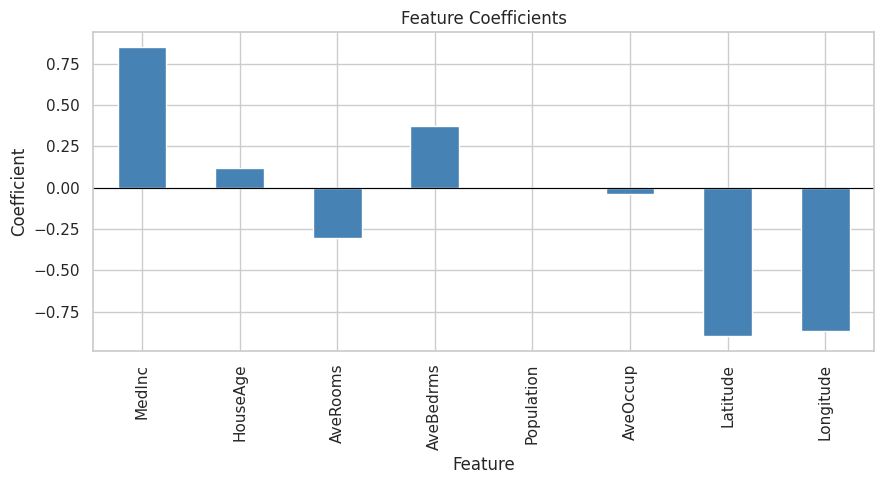
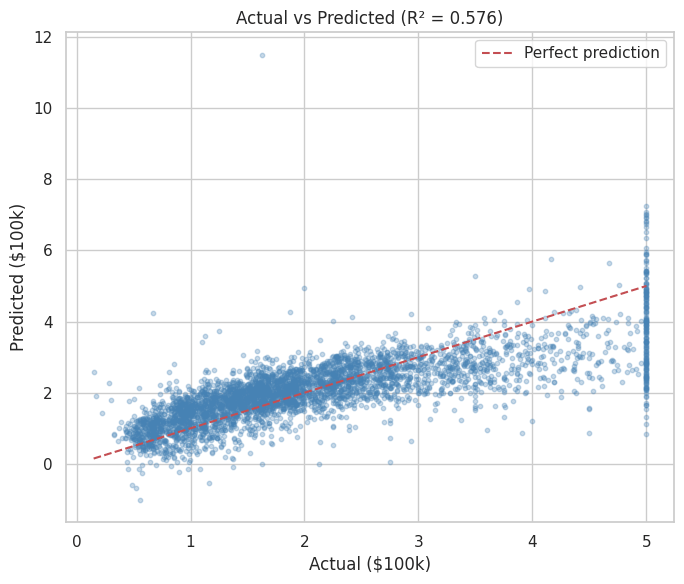
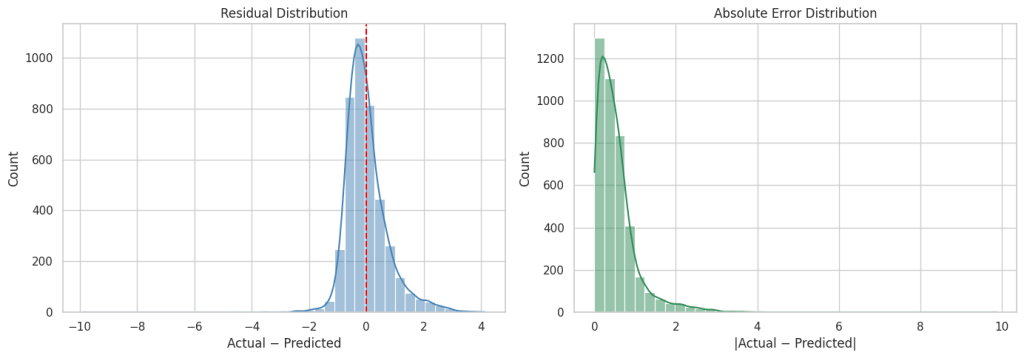
As you can see from the above metrics that overall this plain vanilla regression model is doing a decent job. However, it can be significantly improved upon by either doing feature engineering such as binning, multicollinearity and heteroscedasticity fixes etc. or by leveraging more robust techniques such as Elastic Net, Ridge Regression or SGD Regression, Non Linear models.
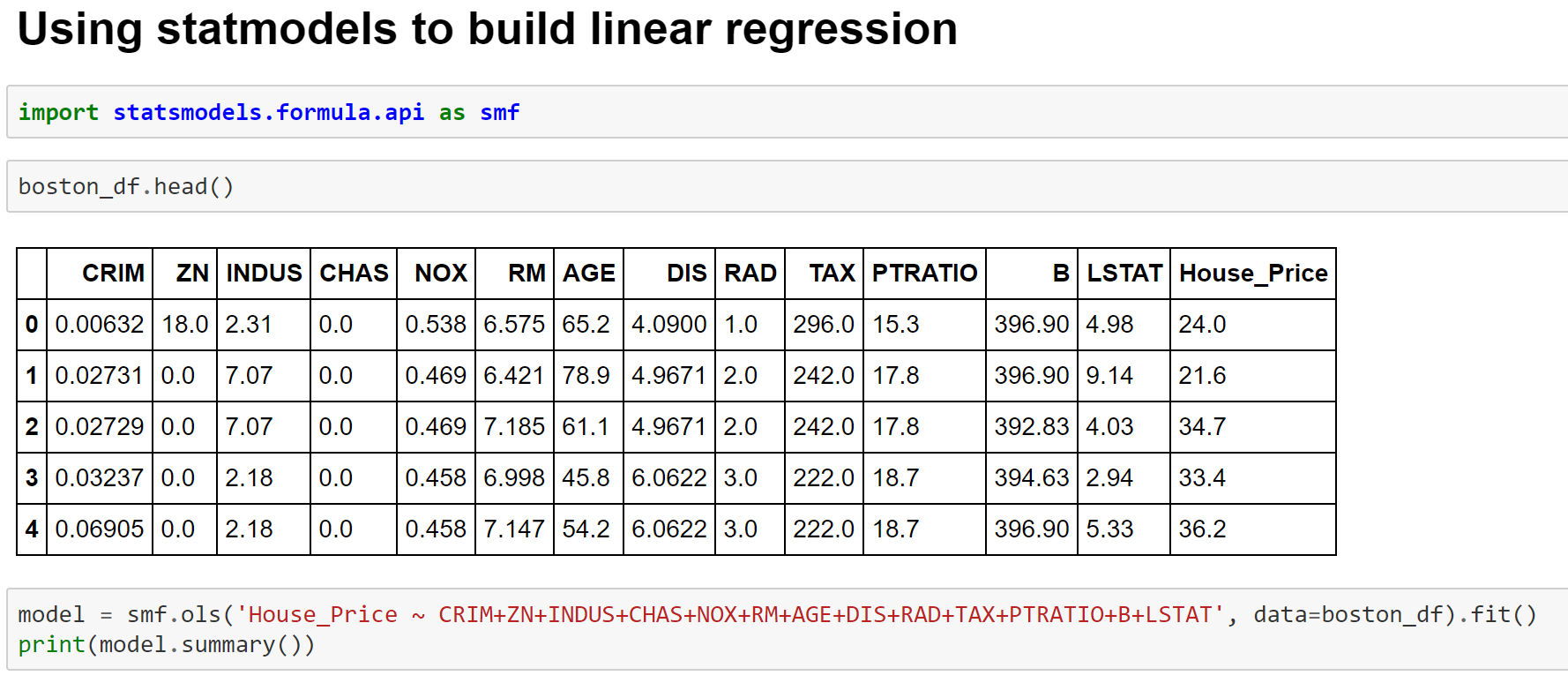
Building Linear Model using statsmodels module
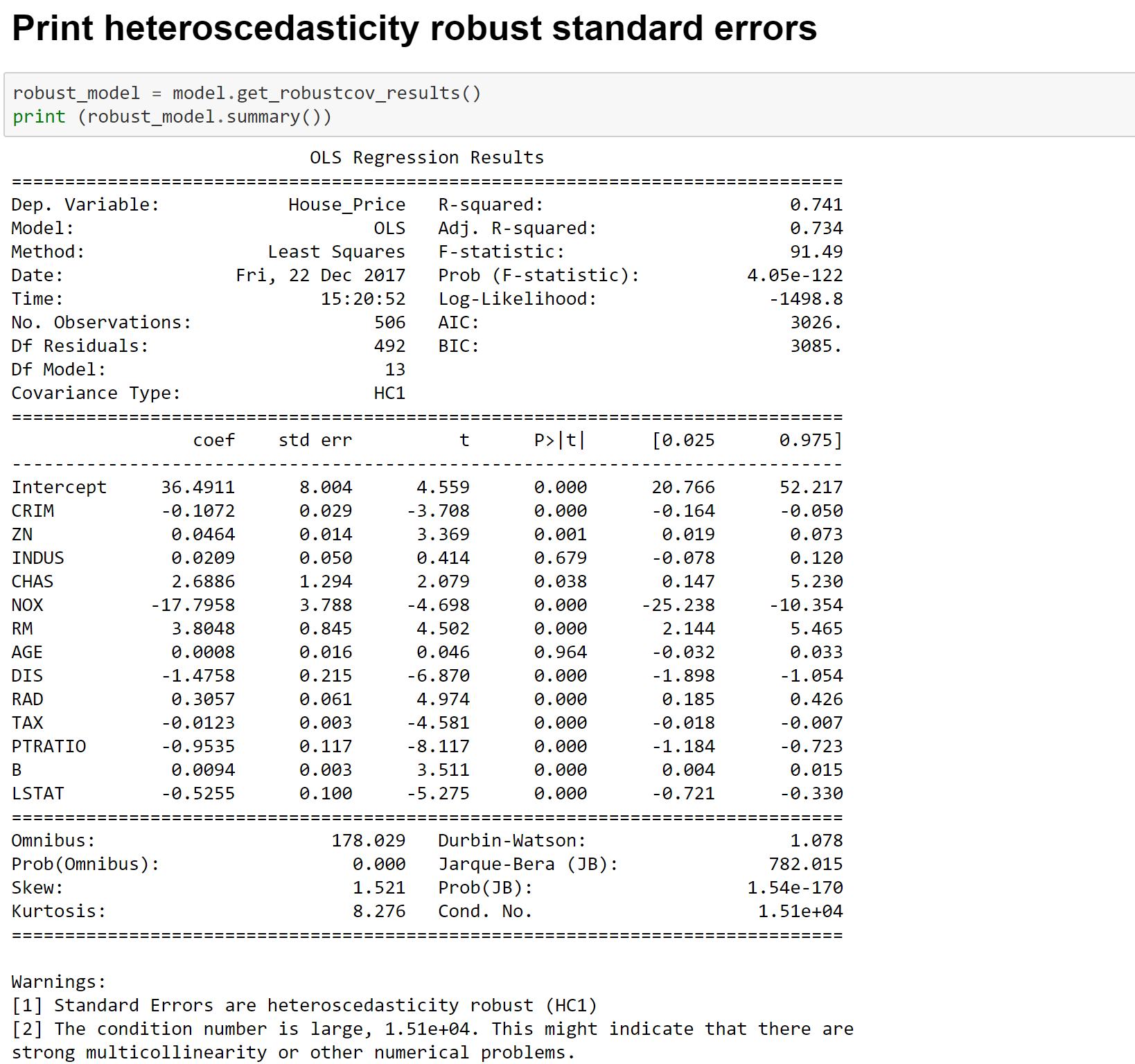
Image 9- Fitting Linear Regression Model using StatmodelsImage 10- OLS Regression OutputImage 11- Fitting Linear Regression Model with Significant VariablesImage 12- Heteroscedasticity Consistent Linear Regression Estimates
More details on the metrics can be found at the below links-
Here are some examples on how you can check that necessary packages are installed in the python environment and check their version before moving forward. These are some of the must have packages. If any of the packages are not installed, you can do the anaconda install using conda prompt. Further directions are shown in the link
You can search for any package in anaconda environment by using the following code-
anaconda search -t conda seaborn
Installing a package using anaconda prompt is as simple as the line shown below. In this case we are installing a package called Seaborn on anaconda prompt. You can go to the anaconda prompt by typing anaconda prompt in the search menu.
conda install seaborn
Please note that sometimes the anaconda prompt may not let you install new packages and display certain errors like “access denied“. In that case you need to right click on the anaconda prompt shortcut and start as an administrator.
If your conda prompt screen is getting too cluttered you can always clear the screen by typing the command “cls”























You must be logged in to post a comment.