
What is a “Linear Regression”-
Linear regression is one of the most powerful and yet very simple machine learning algorithm. Linear regression is used for cases where the relationship between the dependent and one or more of the independent variables is supposed to be linearly correlated in the following fashion-
Y = b0 + b1*X1 + b2*X2 + b3*X3 + …..
Here Y is the dependent variable and X1, X2, X3 etc are independent variables. The purpose of building a linear regression model is to estimate the coefficients b0, b1, b2 et cetera that provides the least error rate in the prediction. More on the error will be discussed later in this article.
In the above equation, b0 is the intercept, b1 is the coefficient for variable X1, b2 is the coefficient for the variable X2 and so on…
What is a “Simple Linear Regression” and “ Multiple Linear Regression”?
When we have only one independent variable, resulting regression is called a “Simple Linear Regression” when we have 2 or more independent variables the resulting regression is called “Multiple Linear Regression”
What are the requirements for the dependent and independent variables in the regression analysis?
The dependent variable in linear regression is generally Numerical and Continuous such as sales in dollars, gdp, unemployment rate, pollution level, amount of rainfall etc. On the other hand, the independent variables can be either numeric or categorical. However, please note that the categorical variables will need to be dummy coded before we can use these variables for building a regression model in the sklearn library of Python.
What are some of the real world usage of linear regression?
As we discussed earlier, this is one of the most commonly used algorithm in ML. Some of the use cases are listed below-
Example 1-
Predict sales amount of a car company as a function of the # of models, new models, price, discount,GDP, interest rate, unemployment rate, competitive prices etc.
Example 2-
Predict weight gain/loss of a person as a function of calories intake, junk food, genetics, exercise time and intensity, sleep, festival time, diet plans, medicines etc.
Example 3-
Predict house prices as a function of sqft, # of rooms, interest rate, parking, pollution level, distance from city center, population mix etc.
Example 4-
Predict GDP growth rate as a function of inflation, unemployment rate, investment, new business, weather pattern, resources, population
How do we evaluate linear regression model’s performance?
There are many metrics that can be used to evaluate a linear regression model’s performance and choose the best model. Some of the most commonly used metrics are-
Mean Square Error (MSE)- This is an error and lower the amount the better it is. It is defined using the below formula
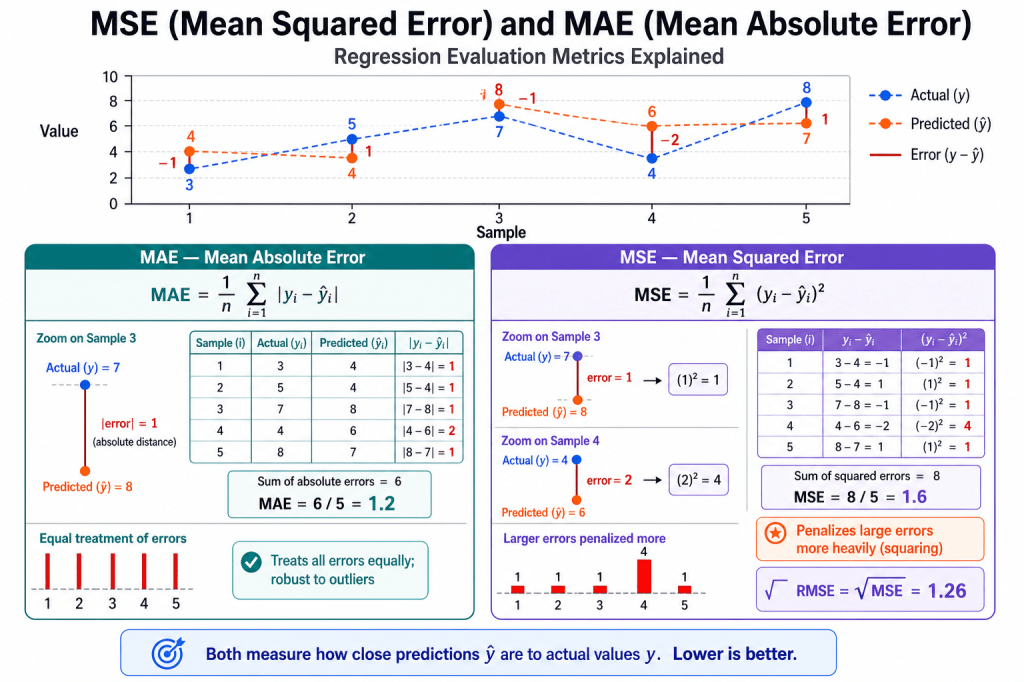
R Square– This is called coefficient of determination and provides a gauge of model’s explaining power. For example, for a linear regression model with a RSquare of 0.70 or 70% would imply that 70% of the variation in the dependent variable can be explained by the model that has been built.
Assumptions of Linear Regression
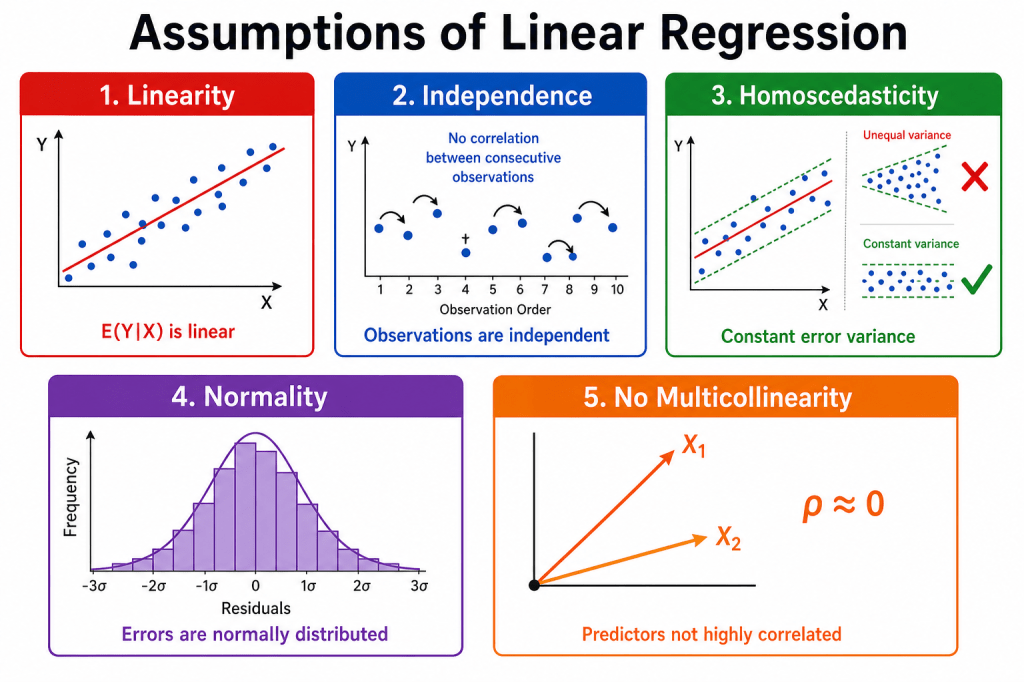
The five assumptions
1. Linearity — E(Y|X) should follow a straight line, not a curve. Check with scatter plots and residual vs. fitted plots. Fix with transforms, polynomial terms, or nonlinear models.
2. Independence — Errors should not correlate across observations (common in time series or repeated measures). Check with Durbin–Watson or residuals vs. order. Fix with GLS, mixed models, or cluster-robust standard errors.
3. Homoscedasticity — Residual spread should stay constant across X. A funnel shape in the residual plot is a red flag. Fix with robust standard errors, WLS, or log transforms.
4. Normality — Residuals should be roughly bell-shaped. Matters most for small samples; large samples are often more forgiving. Check with Q–Q plots.
5. No multicollinearity — Predictors should not be almost redundant. High VIF can make individual coefficients unstable even when overall prediction is fine. Fix by dropping or combining predictors, or using ridge regression.
How do we build a linear regression model in Python?
In this exercise, we will build a linear regression model on Boston housing data set which is an inbuilt data in the scikit-learn library of Python. However, before we go down the path of building a model, let’s talk about some of the basic steps in any machine learning model in Python
In most cases, any of the machine learning algorithm in sklearn library will follow the following steps-
- Split original data into features and label. In other words, create dependent variable and set of independent variables in two different arrays separately. Please note this requirement exists only for the supervised learning ( where a dependent variable is present). For unsupervised learning, we don’t have a dependent variable and hence there is no need to split the data into features and label
- Scale or Normalize the features and label data. Please note that this is not a necessity for all algorithms and/or datasets. Also we are assuming that all the data cleaning and feature engineering such as missing value treatment, outlier treatment, bogus values fixes and dummy coding of the categorical variables have been done before doing this step
- Create training and test data sets from the original data. Training data set will be used for training the model whereas the test data set will be used for validating the accuracy or the prediction power of the model on a new dataset. We would need to split both the features and labels into the training and the test split.
- Create an instance of the model object that will be used for the modelling exercise. This process is called “Instantiation”. In simpler words, during this process we are loading the model package necessary to build a model.
- “Fit” the model instance on the training data. During this step, the model is leveraging both the features and the label information provided in the training data to connect the features to label. Please note that we are going with all the default option during fitting of the model. As you get more expertise you may want to play with some parameter optimization, however we are just going with the defaults for now.
- “Predict” using the model instance on test data. During this step, the model is only using the features information to predict the label.
- Based on the predictions generated on the test data, we generate key performance indicators of model performance. This generally includes metrics such as Precision, Recall F score, Confusion Matrix, Accuracy, Mean Square Error (MSE), Root Mean Square Error (RMSE), Mean Absolute Error (MAE), Area Under the Curve (AUC), Mean Absolute Percentage error (MAPE) etc.
- Once the model performance is evaluated and its deemed to be satisfactory for the purpose of the business uses, we implement the model for new unseen data
So let’s get started with building this model-
Overview
The dataset has 20,640 rows — one row per census block group in California (1990 U.S. Census). The goal is to predict median house value in a block from local demographic and housing features.
Target variable
| Column | Description |
|---|---|
| MedHouseVal | Median house value in the block group, in $100,000 units (e.g. 2.5 ≈ $250,000). Values are capped at 5.0 ($500,000). |
Features (8 predictors)
| Column | Description |
|---|---|
| MedInc | Median income in the block group |
| HouseAge | Median age of houses in the block group |
| AveRooms | Average number of rooms per household |
| AveBedrms | Average number of bedrooms per household |
| Population | Total population in the block group |
| AveOccup | Average number of household members |
| Latitude | Block group latitude |
| Longitude | Block group longitude |
import warningsimport matplotlib.pyplot as pltimport numpy as npimport pandas as pdimport seaborn as snsfrom scipy import statsfrom sklearn.datasets import fetch_california_housingfrom sklearn.linear_model import LinearRegressionfrom sklearn.metrics import mean_absolute_error, mean_squared_error, r2_scorefrom sklearn.model_selection import train_test_splitfrom sklearn.preprocessing import StandardScalerwarnings.filterwarnings("ignore")sns.set_theme(style="whitegrid")# --- Load data & EDA ---housing = fetch_california_housing()df = pd.DataFrame(housing.data, columns=housing.feature_names)df["MedHouseVal"] = housing.targetprint("Shape:", df.shape)print(df.head())print(df.describe())print("Missing values:\n", df.isnull().sum())corr = df.corr()print("\nCorrelation matrix:\n", corr.round(3))plt.figure(figsize=(10, 8))sns.heatmap(corr, annot=True, fmt=".2f", cmap="coolwarm", center=0, linewidths=0.5)plt.title("Correlation Heatmap")plt.tight_layout()plt.show()# --- STEP 1: features & label ---X = df.drop("MedHouseVal", axis=1)y = df["MedHouseVal"]# --- STEP 2: scale ---X_scaled = pd.DataFrame(StandardScaler().fit_transform(X), columns=X.columns)# --- STEP 3: train/test split ---X_train, X_test, y_train, y_test = train_test_split( X_scaled, y, test_size=0.2, random_state=42)# --- STEP 4 & 5: instantiate & fit ---model = LinearRegression()model.fit(X_train, y_train)print(f"\nIntercept: {model.intercept_:.4f}")coef_df = pd.DataFrame({"Feature": X.columns, "Coefficient": model.coef_})print(coef_df.sort_values("Coefficient", key=abs, ascending=False))plt.figure(figsize=(9, 5))coef_df.set_index("Feature")["Coefficient"].plot(kind="bar", color="steelblue")plt.title("Feature Coefficients")plt.ylabel("Coefficient")plt.axhline(0, color="black", linewidth=0.8)plt.tight_layout()plt.show()# --- STEP 6: predict & evaluate ---y_pred = model.predict(X_test)r2 = r2_score(y_test, y_pred)mse = mean_squared_error(y_test, y_pred)mae = mean_absolute_error(y_test, y_pred)print(f"\nR² : {r2:.4f}")print(f"MSE : {mse:.4f}")print(f"RMSE : {np.sqrt(mse):.4f}")print(f"MAE : {mae:.4f}")results = pd.DataFrame({ "Actual": y_test.values, "Predicted": y_pred,})results["Error"] = results["Actual"] - results["Predicted"]results["Abs_Error"] = results["Error"].abs()print("\nSample results:\n", results.head(10).round(4))print("\nError summary:\n", results[["Error", "Abs_Error"]].describe().round(4))residuals = results["Error"]abs_errors = results["Abs_Error"]# Actual vs predictedplt.figure(figsize=(7, 6))plt.scatter(results["Actual"], results["Predicted"], alpha=0.3, s=10, color="steelblue")lims = [results["Actual"].min(), results["Actual"].max()]plt.plot(lims, lims, "r--", label="Perfect prediction")plt.xlabel("Actual ($100k)")plt.ylabel("Predicted ($100k)")plt.title(f"Actual vs Predicted (R² = {r2:.3f})")plt.legend()plt.tight_layout()plt.show()# Error distributionsfig, axes = plt.subplots(1, 2, figsize=(14, 5))sns.histplot(residuals, bins=40, kde=True, ax=axes[0], color="steelblue")axes[0].axvline(0, color="red", linestyle="--")axes[0].set_title("Residual Distribution")axes[0].set_xlabel("Actual − Predicted")sns.histplot(abs_errors, bins=40, kde=True, ax=axes[1], color="seagreen")axes[1].set_title("Absolute Error Distribution")axes[1].set_xlabel("|Actual − Predicted|")plt.tight_layout()plt.show()# Residuals vs fitted & Q-Q plotfig, axes = plt.subplots(1, 2, figsize=(13, 5))axes[0].scatter(results["Predicted"], residuals, alpha=0.3, s=10, color="steelblue")axes[0].axhline(0, color="red", linestyle="--")axes[0].set_xlabel("Predicted ($100k)")axes[0].set_ylabel("Residual")axes[0].set_title("Residuals vs Fitted")stats.probplot(residuals, dist="norm", plot=axes[1])axes[1].set_title("Q-Q Plot")plt.tight_layout(plt.show()
Output from the above code-
Shape: (20640, 9)
   MedInc  HouseAge  AveRooms  AveBedrms  Population  AveOccup  Latitude  Longitude  MedHouseVal
0  8.3252      41.0  6.984127   1.023810       322.0  2.555556     37.88    -122.23        4.526
1  8.3014      21.0  6.238137   0.971880      2401.0  2.109842     37.86    -122.22        3.585
2  7.2574      52.0  8.288136   1.073446       496.0  2.802260     37.85    -122.24        3.521
3  5.6431      52.0  5.817352   1.073059       558.0  2.547945     37.85    -122.25        3.413
4  3.8462      52.0  6.281853   1.081081       565.0  2.181467     37.85    -122.25        3.422
             MedInc      HouseAge      AveRooms     AveBedrms    Population      AveOccup      Latitude     Longitude  \
count  20640.000000  20640.000000  20640.000000  20640.000000  20640.000000  20640.000000  20640.000000  20640.000000
mean       3.870671     28.639486      5.429000      1.096675   1425.476744      3.070655     35.631861   -119.569704
std        1.899822     12.585558      2.474173      0.473911   1132.462122     10.386050      2.135952      2.003532
min        0.499900      1.000000      0.846154      0.333333      3.000000      0.692308     32.540000   -124.350000
25%        2.563400     18.000000      4.440716      1.006079    787.000000      2.429741     33.930000   -121.800000
50%        3.534800     29.000000      5.229129      1.048780   1166.000000      2.818116     34.260000   -118.490000
75%        4.743250     37.000000      6.052381      1.099526   1725.000000      3.282261     37.710000   -118.010000
max       15.000100     52.000000    141.909091     34.066667  35682.000000   1243.333333     41.950000   -114.310000

        MedHouseVal
count  20640.000000
mean       2.068558
std        1.153956
min        0.149990
25%        1.196000
50%        1.797000
75%        2.647250
max        5.000010
Missing values:
 MedInc         0
HouseAge       0
AveRooms       0
AveBedrms      0
Population     0
AveOccup       0
Latitude       0
Longitude      0
MedHouseVal    0
dtype: int64

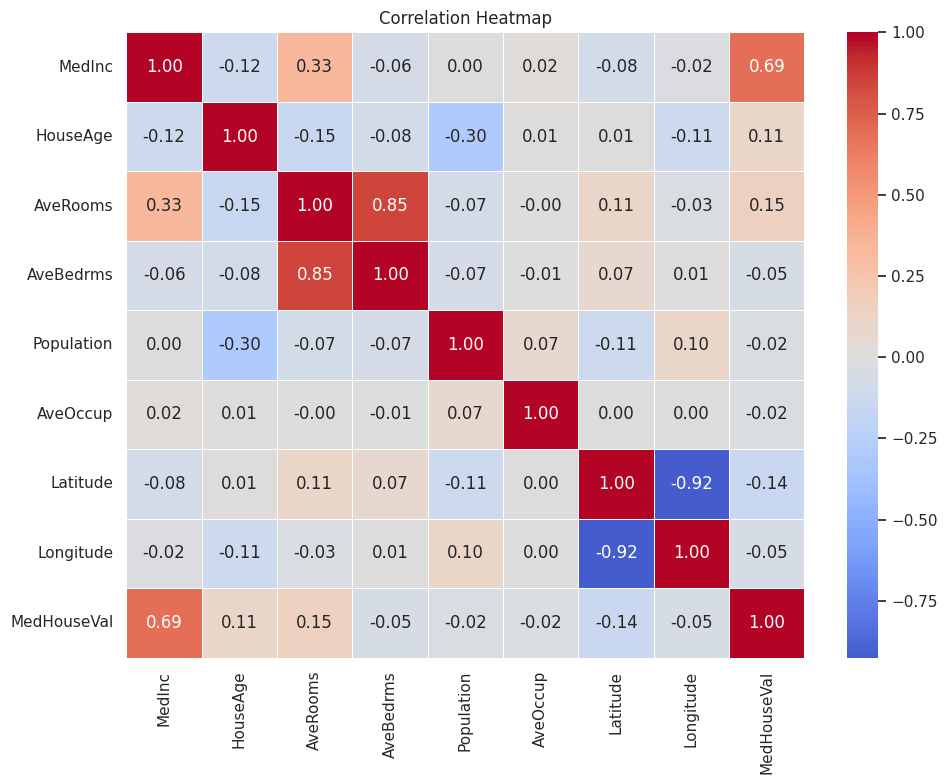
Correlation matrix:
              MedInc  HouseAge  AveRooms  AveBedrms  Population  AveOccup  Latitude  Longitude  MedHouseVal
MedInc        1.000    -0.119     0.327     -0.062       0.005     0.019    -0.080     -0.015        0.688
HouseAge     -0.119     1.000    -0.153     -0.078      -0.296     0.013     0.011     -0.108        0.106
AveRooms      0.327    -0.153     1.000      0.848      -0.072    -0.005     0.106     -0.028        0.152
AveBedrms    -0.062    -0.078     0.848      1.000      -0.066    -0.006     0.070      0.013       -0.047
Population    0.005    -0.296    -0.072     -0.066       1.000     0.070    -0.109      0.100       -0.025
AveOccup      0.019     0.013    -0.005     -0.006       0.070     1.000     0.002      0.002       -0.024
Latitude     -0.080     0.011     0.106      0.070      -0.109     0.002     1.000     -0.925       -0.144
Longitude    -0.015    -0.108    -0.028      0.013       0.100     0.002    -0.925      1.000       -0.046
MedHouseVal   0.688     0.106     0.152     -0.047      -0.025    -0.024    -0.144     -0.046        1.000
Intercept: 2.0679
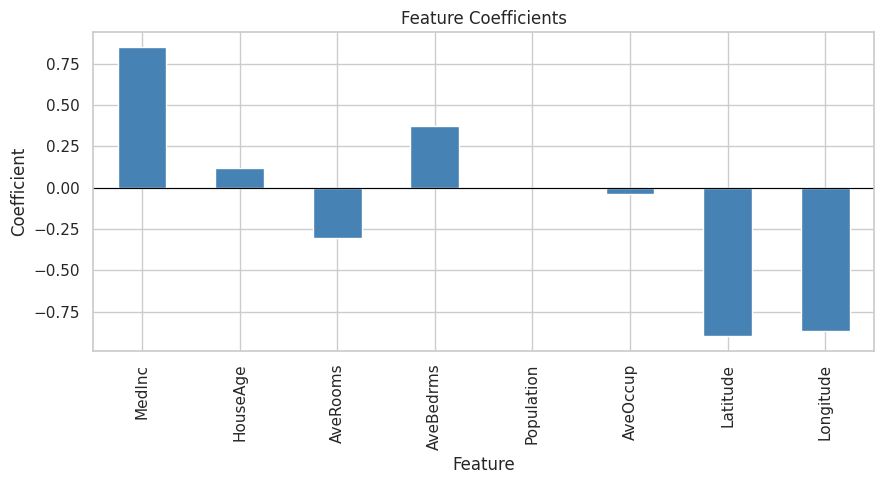
      Feature  Coefficient
6    Latitude    -0.896635
7   Longitude    -0.868927
0      MedInc     0.852382
3   AveBedrms     0.371132
2    AveRooms    -0.305116
1    HouseAge     0.122382
5    AveOccup    -0.036624
4  Population    -0.002298
R²   : 0.5758
MSE  : 0.5559
RMSE : 0.7456
MAE  : 0.5332

Sample results:
    Actual  Predicted   Error  Abs_Error
0   0.477     0.7191 -0.2421     0.2421
1   0.458     1.7640 -1.3060     1.3060
2   5.000     2.7097  2.2904     2.2904
3   2.186     2.8389 -0.6529     0.6529
4   2.780     2.6047  0.1753     0.1753
5   1.587     2.0118 -0.4248     0.4248
6   1.982     2.6455 -0.6635     0.6635
7   1.575     2.1688 -0.5938     0.5938
8   3.400     2.7407  0.6593     0.6593
9   4.466     3.9156  0.5504     0.5504

Error summary:
            Error  Abs_Error
count  4128.0000  4128.0000
mean      0.0035     0.5332
std       0.7457     0.5212
min      -9.8753     0.0001
25%      -0.4609     0.1968
50%      -0.1224     0.4102
75%       0.3124     0.6886
max       4.1484     9.8753
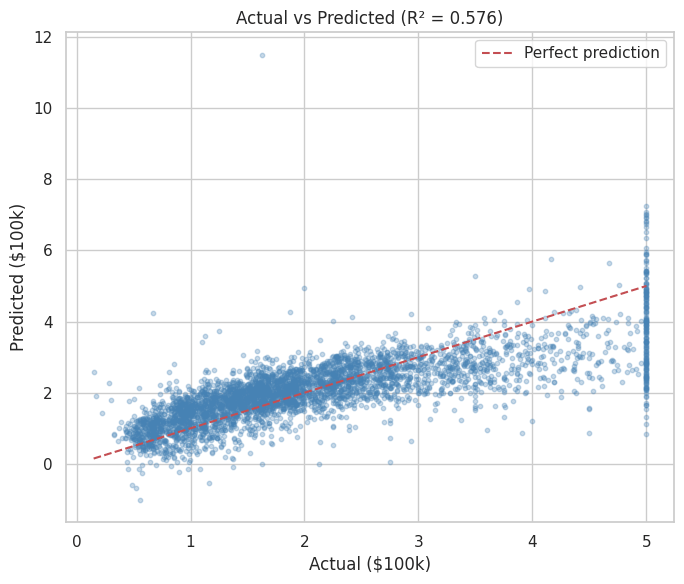
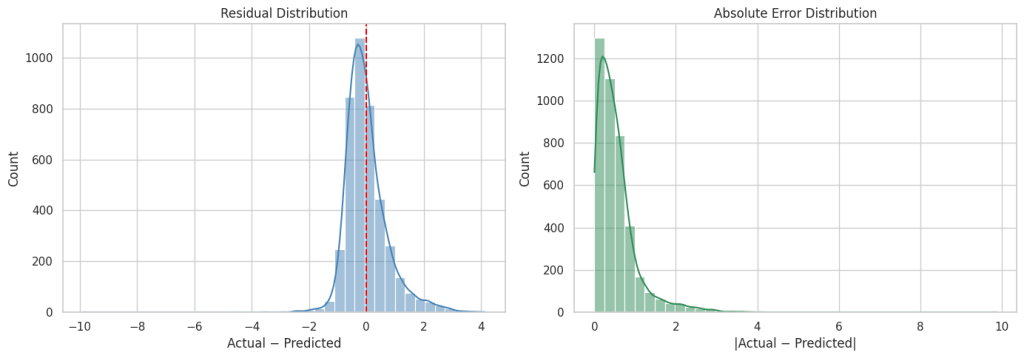
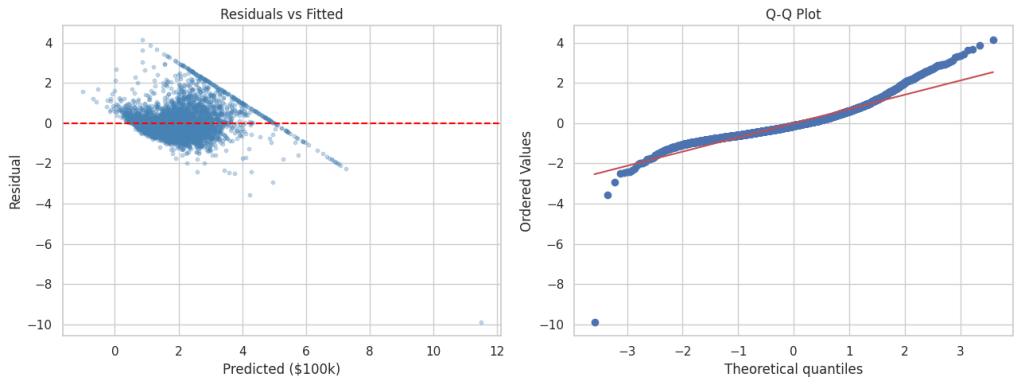
As you can see from the above metrics that overall this plain vanilla regression model is doing a decent job. However, it can be significantly improved upon by either doing feature engineering such as binning, multicollinearity and heteroscedasticity fixes etc. or by leveraging more robust techniques such as Elastic Net, Ridge Regression or SGD Regression, Non Linear models.
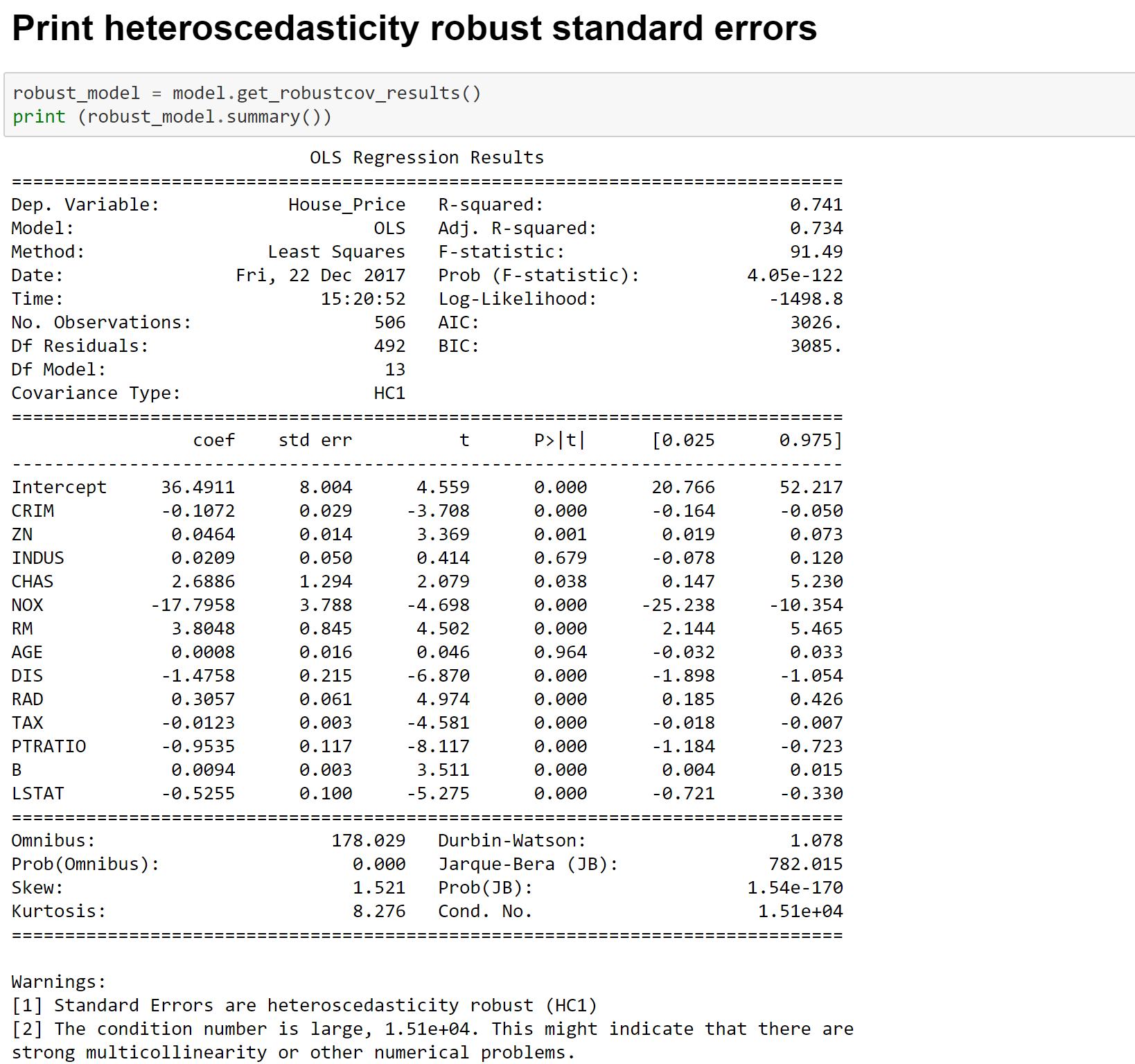
Building Linear Model using statsmodels module
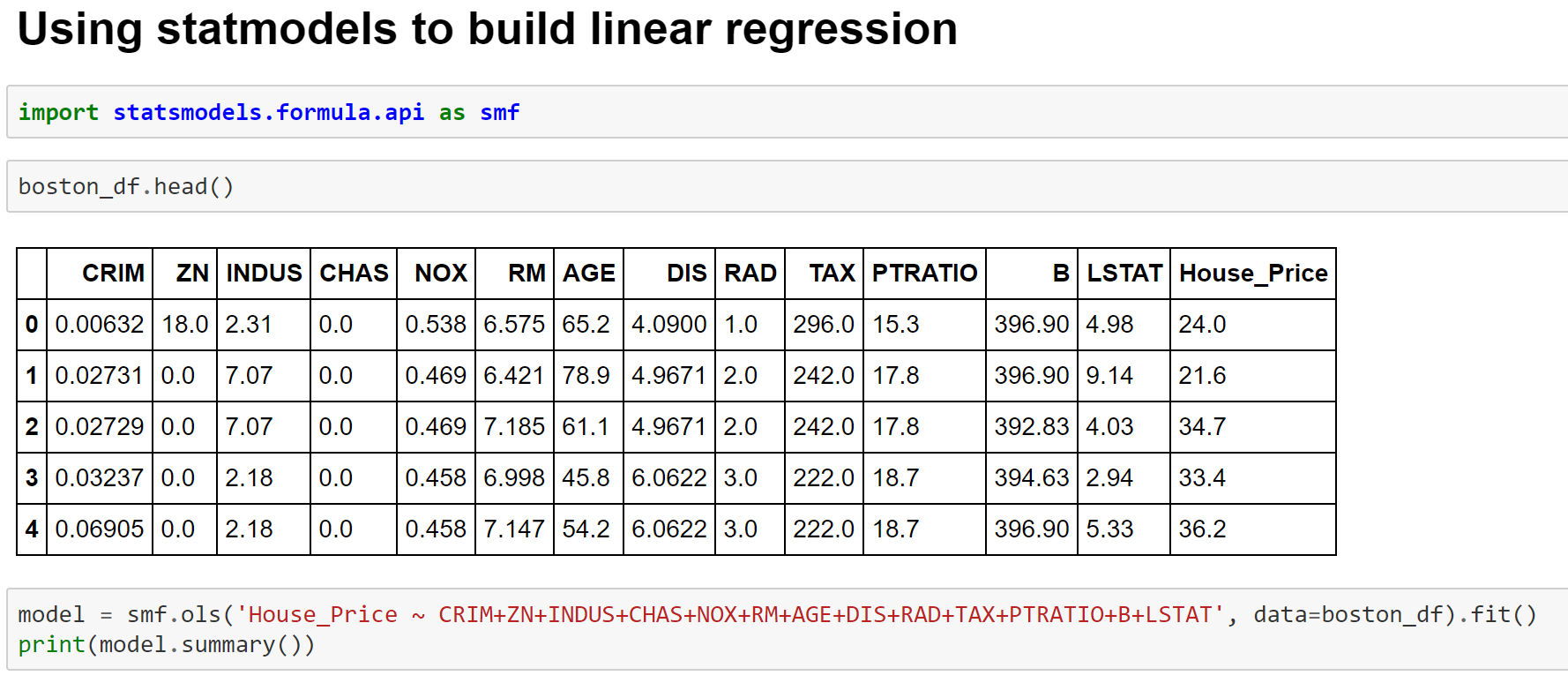


More details on the metrics can be found at the below links-
Here is a blog with excellent explanation of all metrics
Cheers!


You must be logged in to post a comment.