To solve any problem we need to have some way of breaking down the problem. There are two main ways of reasoning to that effect-
Deductive Reasoning– This is also called as “Top Down” approach or “Formal Logic” approach. The key here is to form hypotheses to explain a certain phenomenon and then go to reject or accept related hypotheses. The conclusions and recommendation coming out from this sort of reasoning are more certain and factual in nature.
For example, let’s say you are trying to explain why a certain car gives lower miles per gallon. Because you know the business and have more context on this problem, you can start with potential hypotheses-
Weight of the car is high
Car has higher number or cylinders
Car has higher horse power
and so on…
You will check each of the above hypotheses and reach to a definite conclusion.
Inductive Reasoning– On the other hand, this is a “Bottom Up” approach or “Informal Logic” approach. This sort of reasoning is more exploratory in nature. The end goal is to form some hypotheses to give possible reasons to explain certain phenomenon.
For example, let’s say you are trying to explain why sales of an eCommerce company has gone down in a particular quarter. You may begin by an exploratory analysis where you can begin with potential driver factors such as-
Marketing spend of the company
Pricing
Competitive landscape
Macro economic factors
You will do data analysis to correlate each of the above factors to the sales and find potential reasons or build potential hypotheses to be tested further.
Regularized Regression Techniques: Lasso, Ridge, and Elastic Net
Regularized regression methods are essential tools in machine learning and statistics that help prevent overfitting and improve model generalization by adding penalty terms to the standard linear regression cost function. These techniques are particularly valuable when dealing with high-dimensional data or when the number of features approaches or exceeds the number of observations.
Ridge regression, also known as L2 regularization, adds a penalty term proportional to the sum of squared coefficients to the ordinary least squares (OLS) cost function. This method shrinks the regression coefficients toward zero but never makes them exactly zero.
Ridge Regression ( L2 )
Objective minimize: Σ ( yᵢ − ŷᵢ )² + λ · Σ βⱼ²
ŷᵢ = β₀ + Σ βⱼ xᵢⱼ
λ ≥ 0 controls the amount of shrinkage
All predictors stay in the model, but coefficients are pulled toward 0.
Lasso Regression ( L1 )
Lasso regression (Least Absolute Shrinkage and Selection Operator) uses L1 regularization, adding a penalty term proportional to the sum of absolute values of coefficients. Unlike Ridge regression, Lasso can drive coefficients to exactly zero, effectively performing feature selection.
Objective minimize: Σ ( yᵢ − ŷᵢ )² + λ · Σ |βⱼ|
Same ŷᵢ and λ as above
The absolute-value penalty can push some βⱼ exactly to 0, giving automatic feature selection.
Elastic Net ( L1 + L2 )
Elastic Net regression combines both L1 and L2 penalties, leveraging the strengths of both Ridge and Lasso regression methods. This hybrid approach is particularly effective when dealing with groups of correlated features.
0 ≤ α ≤ 1 mixes the two penalties – α = 1 → pure Lasso – α = 0 → pure Ridge
Balances variable selection (L1) with coefficient shrinkage (L2), handling groups of correlated features well.
How to choose
Ridge – keep all features, tame multicollinearity.
Lasso – need a sparse, easily interpretable model.
Elastic Net – expect correlated predictors or want a middle ground.
Tune λ (and α for Elastic Net) with cross-validation for best performance.
Here is a working example code on the Housing data. Please note, generally before doing regularized GLM regression it is advised to scale variables. However, in the below example we are working with the variables on the original scale to demonstrate each algorithms working.
# Import necessary libraries
from sklearn.linear_model import LinearRegression, Lasso, Ridge, ElasticNet
from sklearn.model_selection import GridSearchCV, train_test_split
from sklearn.metrics import mean_squared_error, mean_absolute_error, r2_score
from sklearn.datasets import fetch_california_housing
from sklearn.preprocessing import StandardScaler
import pandas as pd
import numpy as np
import matplotlib.pyplot as plt
import seaborn as sns

# Load the California Housing dataset
data = fetch_california_housing(as_frame=True)
df = data.frame

# Preprocess the data
X = df.drop(columns=['MedHouseVal'])
y = df['MedHouseVal']
scaler = StandardScaler()
X_scaled = scaler.fit_transform(X)

# Split the data into training and testing sets
X_train, X_test, y_train, y_test = train_test_split(X_scaled, y, test_size=0.2, random_state=42)

# Fit Linear Regression model
linear_model = LinearRegression()
linear_model.fit(X_train, y_train)
y_pred_linear = linear_model.predict(X_test)

# Fit Lasso Regression model with hyperparameter tuning
lasso_params = {'alpha': [0.01, 0.1, 1, 10, 100]}
lasso_model = GridSearchCV(Lasso(), lasso_params, cv=5, scoring='r2')
lasso_model.fit(X_train, y_train)
y_pred_lasso = lasso_model.best_estimator_.predict(X_test)

# Fit Ridge Regression model with hyperparameter tuning
ridge_params = {'alpha': [0.01, 0.1, 1, 10, 100]}
ridge_model = GridSearchCV(Ridge(), ridge_params, cv=5, scoring='r2')
ridge_model.fit(X_train, y_train)
y_pred_ridge = ridge_model.best_estimator_.predict(X_test)

# Fit Elastic Net Regression model with hyperparameter tuning
elastic_params = {'alpha': [0.01, 0.1, 1, 10, 100], 'l1_ratio': [0.1, 0.5, 0.9]}
elastic_model = GridSearchCV(ElasticNet(), elastic_params, cv=5, scoring='r2')
elastic_model.fit(X_train, y_train)
y_pred_elastic = elastic_model.best_estimator_.predict(X_test)

# Evaluate models
results = pd.DataFrame({
    'Model': ['Linear', 'Lasso', 'Ridge', 'Elastic Net'],
    'MSE': [mean_squared_error(y_test, y_pred_linear),
            mean_squared_error(y_test, y_pred_lasso),
            mean_squared_error(y_test, y_pred_ridge),
            mean_squared_error(y_test, y_pred_elastic)],
    'MAE': [mean_absolute_error(y_test, y_pred_linear),
            mean_absolute_error(y_test, y_pred_lasso),
            mean_absolute_error(y_test, y_pred_ridge),
            mean_absolute_error(y_test, y_pred_elastic)],
    'R²': [r2_score(y_test, y_pred_linear),
           r2_score(y_test, y_pred_lasso),
           r2_score(y_test, y_pred_ridge),
           r2_score(y_test, y_pred_elastic)]
})
print(results)

# Plot model performance
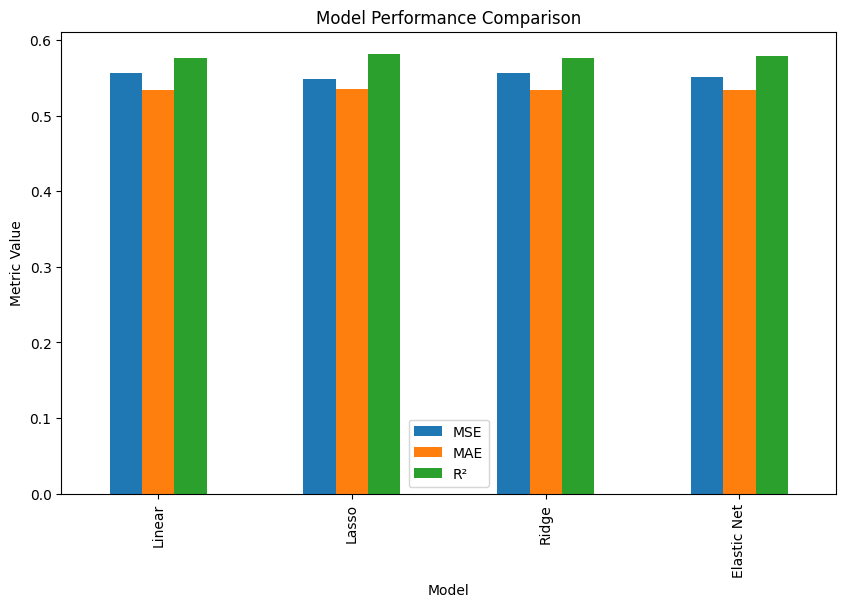
results.set_index('Model').plot(kind='bar', figsize=(10, 6))
plt.title('Model Performance Comparison')
plt.ylabel('Metric Value')
plt.show()

# Display coefficients for each model
coefficients = pd.DataFrame({
    'Feature': data.feature_names,
    'Linear': linear_model.coef_,
    'Lasso': lasso_model.best_estimator_.coef_,
    'Ridge': ridge_model.best_estimator_.coef_,
    'Elastic Net': elastic_model.best_estimator_.coef_
})
print(coefficients)

# Plot coefficients
coefficients.set_index('Feature').plot(kind='bar', figsize=(12, 8))
plt.title('Feature Coefficients for Each Model')
plt.ylabel('Coefficient Value')
plt.show()
After you have built a machine learning model which is doing a great job in prediction, you don’t have to retrain your model again and again for future usage. Instead, you can use Python pickle serialization for reusing this model in future and transferring it into a production environment where non modelers can also use this model to make predictions.
By Renee Comet (photographer) [Public domain], via Wikimedia Commons
First let’s look at how Wikipedia defines a pickle
Pickling is the process of preserving or expanding the lifespan of food by either anaerobic fermentation in brine or immersion in vinegar. The resulting food is called a pickle.
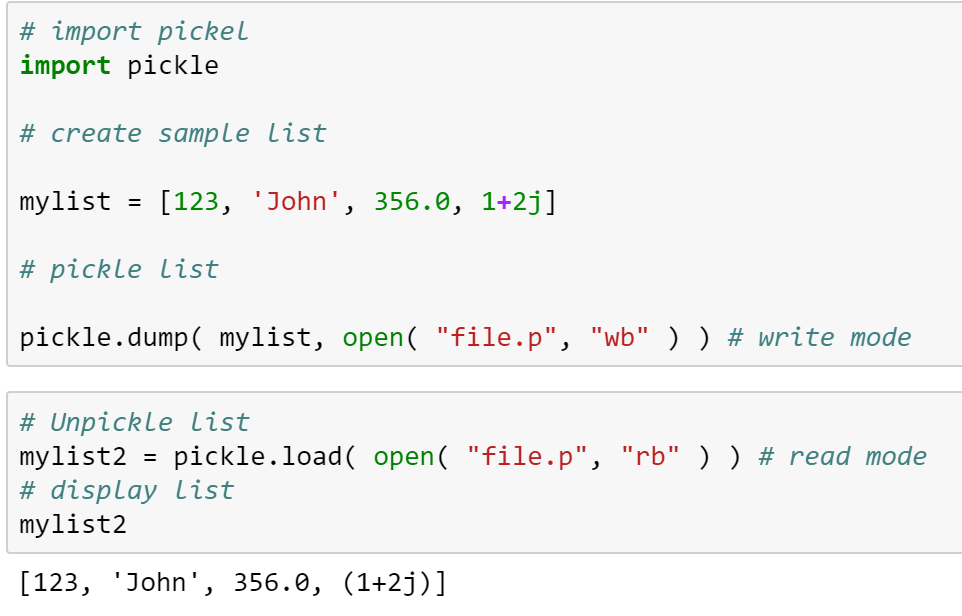
Python pickling is the same process without brine or vinegar, whereas you will pickle your model for longer usage without the need for you to recook your models. In a “Pickling” process a Python object is converted into a byte stream. On the other hand, in an “Unpickling” process a byte stream is converted back into Python object.
Recurrent Neural Network (RNN) are a special type of feed-forward network used for sequential data analysis where inputs are not independent and are not of fixed length as is assumed in some of the other neural networks such as MLP. Rather in this case, inputs are dependent on each other along the time dimension. In other words, what happens in time ‘t’ may depend on what happened in time ‘t-1’, ‘t-2’ and so on.
These are also called ‘memory’ networks as previous inputs and states persist in the model for doing a more optimal sequential analysis. They can have both short term and long term time dependence. Due to their capabilities of handling sequential data very well, these networks are typically very suitable for speech recognition, sentiment analysis, forecasting, language translation and other such applications.
Let’s now spend sometime looking at how a RNN work-
Recurrent Neural Network (RNN)
As you may recall, in a typical feed-forward neural network input is fed at beginning and then hidden layers do the processing and finally output layer spits out the output. On the other hand, in a RNN generally speaking we will have different input, output and cost function for each time stamp. However, the same weight matrix is fed to all layers in the network.
One point to note is that RNNs are also trained using backward propagation of errors and gradient descent to minimize cost function. However, backward propagation in RNN happen over different time stamps and hence it’s called Backward Propagation Through Time (BPTT). In a typical RNN, we may have several time stamp layers which sometimes may range in hundreds or thousands and therein lies the problem of vanishing gradient or exploding gradient that these pure vanilla RNNs are particularly susceptible for.
There are various techniques such as gradient clipping and architecture such as Long Short Term Memory (LSTM) or Gated Recurrent Unit (GRU) which help in fixing the vanishing gradient and exploding gradient issues. We will delve deeper into how an LSTM work.
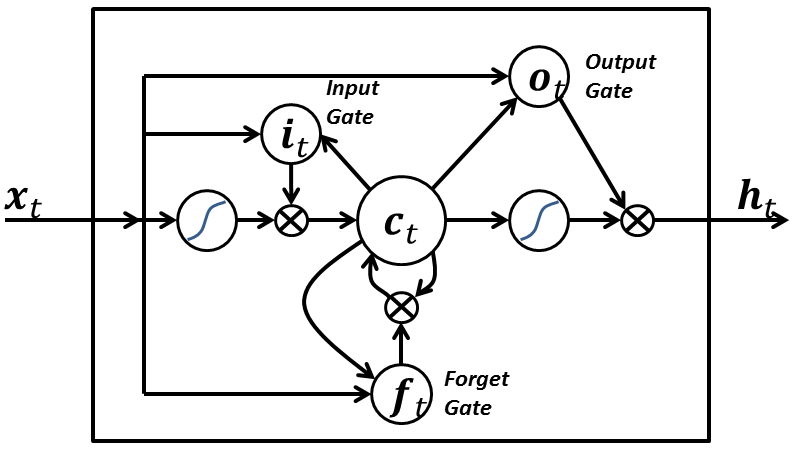
A LSTM network consist of hidden layers that have many LSTM blocks or units. In turn each LSTM unit will have the following components-
Memory Cell- The component that remembers the values over a period of time. This has an activation function
Input gate- Enables addition of info to the memory cell. Generally has as an tanh activation to squash the values between -1 and +1
Forget gate- Enables removing or retaining from the memory cell. This will generally have a sigmoid activation function and hence the output values will range between 0 and 1. If the gate is on, then all memories are retained. If the gate is turned-off, all values will be removed.
Output gate- Retrieve information from the memory cell passed through the tanh activation
Long Short Term Memory Cell or Block (Source- Wiki)
Let’s work through an example which we used in a previous article.
Here is an excellent article in case you want to explore more.
Ensemble models are a great tool to fix the variance-bias trade-off which a typical machine learning model faces, i.e. when you try to lower bias, variance will go higher and vice-versa. This generally results in higher error rates.
Total Error in Model = Bias + Variance + Random Noise
Variance and Bias Trade-off
Ensemble models typically combine several weak learners to build a stronger model, which will reduce variance and bias at the same time. Since ensemble models follow a community learning or divide and conquer approach, output from ensemble models will be wrong only when the majority of underlying learners are wrong.
One of the biggest flip side of ensemble models is that they may become “Black Box” and not very explainable as opposed a simple machine learning model. However, the gains in model performances generally outweigh any loss in transparency. That is the reason why you will see top performing models in many high ranking competitions will be generally an ensemble model.
Ensemble models can be broken down into the following three main categories-
Bagging
Boosting
Stacking
Let’s look at each one of them-
Bagging-
One good example of such model is Random Forest
These types of ensemble models work on reducing the variance by removing instability in the underlying complex models
Each learner is asked to do the classification or regression independently and in parallel and then either a voting or averaging of the output of all the learners is done to create the final output
Since these ensemble models are predominantly focuses on reducing the variance, the underlying models are fairly complex ( such as Decision Tree or Neural Network) to begin with low bias
An underlying decision tree will have higher depth and many branches. In other words, the tree will be deep and dense and with lower bias
Boosting-
Some good examples of these types of models are Gradient Boosting Tree, Adaboost, XGboost among others.
These ensemble models work with weak learners and try to improve the bias and variance simultaneously by working sequentially.
These are also called adaptive learners, as learning of one learner is dependent on how other learners are performing. For example, if a certain set of the data has higher mis-classification rate, this sample’s weight in the overall learning will be increased so that the other learners focus more on correctly classifying the tougher samples.
An underlying decision tree will be shallow and a weak learner with higher bias
There are various approaches for building a bagging model such as- pasting, bagging, random subspaces, random patches etc. You can find all details over here.
Stacking-
These meta learning models are what the name suggest. They are stacked models. Or in other words, a particular learner’s output will become an input to another model and so on.
Random Forest: Comprehensive Explanation
Core Concepts
Random Forest is an ensemble learning method that combines multiple decision trees to create a more robust and accurate predictive model. The algorithm works by building numerous decision trees and merging their predictions through voting (for classification) or averaging (for regression).
Key Principles
Bootstrap Aggregating (Bagging): Each tree in the forest is trained on a different bootstrap sample of the original dataset. This means each tree sees a slightly different version of the data, created by randomly sampling with replacement.
Feature Randomness: At each split in each tree, only a random subset of features is considered. This introduces additional randomness and helps prevent overfitting while reducing correlation between trees.
Ensemble Voting: For classification, each tree votes for a class, and the class with the most votes becomes the final prediction. For regression, predictions are averaged across all trees.
Core Assumptions
Independence of Errors: Individual trees should make different types of errors so that when combined, these errors cancel out
Feature Relevance: The dataset should contain features that are actually predictive of the target variable
Sufficient Data: There should be enough data to train multiple diverse trees effectively
Non-linear Relationships: Random forests can capture complex, non-linear relationships between features and targets
Key Equations and Formulas
Bootstrap Sample Size: Each bootstrap sample typically contains the same number of observations as the original dataset (n), created by sampling with replacement.
Number of Features at Each Split: For classification: sqrt(total_features), for regression: total_features/3
Final Prediction for Classification: Prediction = mode(tree1_prediction, tree2_prediction, …, treeN_prediction)
Final Prediction for Regression: Prediction = (tree1_prediction + tree2_prediction + … + treeN_prediction) / N
Out-of-Bag (OOB) Error: Each tree is tested on the ~37% of samples not included in its bootstrap sample, providing an unbiased estimate of model performance without needing a separate validation set.
Variable Importance: Calculated by measuring how much each feature decreases impurity when used for splits, averaged across all trees in the forest.
Advantages
Reduced Overfitting: Ensemble approach generalizes better than individual decision trees
Handles Missing Values: Can maintain accuracy even with missing data
No Feature Scaling Required: Tree-based methods are not affected by feature scaling
Robust to Outliers: Tree splits are not heavily influenced by extreme values
End to End Python Execution-
# - Random Forest Regression on California Housing Dataset
# - RandomizedSearchCV vs GridSearchCV:
# - GridSearchCV exhaustively tries every combination of hyperparameters in the provided grid.
# - RandomizedSearchCV samples a fixed number of random combinations from the grid, making it faster for large search spaces.
# - Both are used for hyperparameter optimization, but RandomizedSearchCV is more efficient when the grid is large or when you want a quick search.

import numpy as np  # For numerical operations
import pandas as pd  # For data manipulation
import matplotlib.pyplot as plt  # For plotting
import seaborn as sns  # For advanced visualizations
from sklearn.datasets import fetch_california_housing  # To load the dataset
from sklearn.model_selection import train_test_split, GridSearchCV, RandomizedSearchCV  # For splitting and hyperparameter search
from sklearn.ensemble import RandomForestRegressor  # Random Forest regression model
from sklearn.metrics import mean_squared_error, r2_score  # For regression metrics
import warnings  # To suppress warnings
warnings.filterwarnings('ignore')  # Ignore warnings for cleaner output

# Load California housing dataset
cal_data = fetch_california_housing()  # Fetch the dataset
X = pd.DataFrame(cal_data.data, columns=cal_data.feature_names)  # Features as DataFrame
y = cal_data.target  # Target variable (median house value)

# Train-test split
X_train, X_test, y_train, y_test = train_test_split(X, y, test_size=0.3, random_state=42)  # Split data into train and test sets

# Fixed lists for hyperparameters
param_list = {
    'n_estimators': [50, 100, 150, 200],  # Number of trees in the forest
    'max_depth': [5, 10, 15, None],  # Maximum depth of the tree
    'min_samples_split': [2, 4, 6, 8],  # Minimum samples required to split a node
    'min_samples_leaf': [1, 2, 3],  # Minimum samples required at a leaf node
    'max_features': ['sqrt', 'log2', None],  # Number of features to consider at each split
    'bootstrap': [True, False]  # Whether bootstrap samples are used
}

# RandomizedSearchCV for Random Forest Regressor
rf = RandomForestRegressor(random_state=42)  # Initialize Random Forest Regressor
random_search = RandomizedSearchCV(
    rf, param_distributions=param_list, n_iter=20, cv=3, scoring='neg_mean_squared_error', n_jobs=-1, random_state=42)  # Randomized hyperparameter search
random_search.fit(X_train, y_train)  # Fit model to training data
print('Best parameters (RandomizedSearchCV):', random_search.best_params_)  # Print best parameters
print('Best score (RandomizedSearchCV):', -random_search.best_score_)  # Print best score (MSE)
rf_random = random_search.best_estimator_  # Get best model

# GridSearchCV for Random Forest Regressor (commented out)
# grid_search = GridSearchCV(
#     rf, param_grid=param_list, cv=3, scoring='neg_mean_squared_error', n_jobs=-1)  # Grid hyperparameter search
# grid_search.fit(X_train, y_train)  # Fit model to training data
# print('Best parameters (GridSearchCV):', grid_search.best_params_)  # Print best parameters
# print('Best score (GridSearchCV):', -grid_search.best_score_)  # Print best score (MSE)
# rf_grid = grid_search.best_estimator_  # Get best model

# Evaluate RandomizedSearchCV model
y_pred = rf_random.predict(X_test)  # Predict on test set
mse = mean_squared_error(y_test, y_pred)  # Calculate mean squared error
r2 = r2_score(y_test, y_pred)  # Calculate R^2 score
print(f'\nRandomizedSearchCV Test MSE: {mse:.4f}')  # Print test MSE
print(f'RandomizedSearchCV Test R2: {r2:.4f}')  # Print test R^2
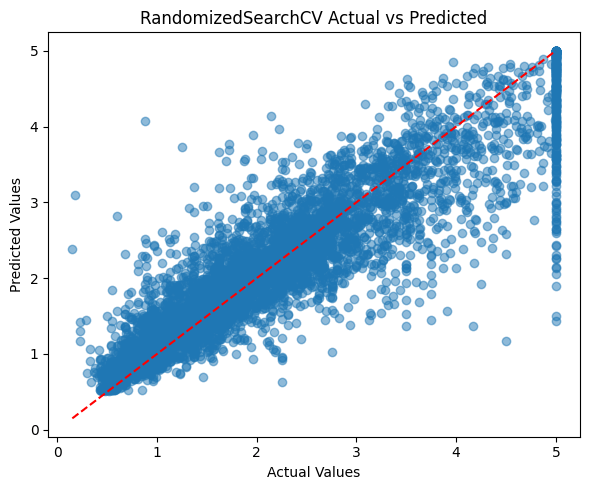
plt.figure(figsize=(6,5))  # Set figure size
plt.scatter(y_test, y_pred, alpha=0.5)  # Scatter plot of actual vs predicted
plt.plot([y_test.min(), y_test.max()], [y_test.min(), y_test.max()], 'r--')  # Diagonal reference line
plt.xlabel('Actual Values')  # X-axis label
plt.ylabel('Predicted Values')  # Y-axis label
plt.title('RandomizedSearchCV Actual vs Predicted')  # Plot title
plt.tight_layout()  # Adjust layout
plt.show()  # Show plot

# Feature importance visualization for best RandomizedSearchCV model
importances = rf_random.feature_importances_  # Get feature importances
indices = np.argsort(importances)[::-1]  # Sort features by importance
plt.figure(figsize=(8,5))  # Set figure size
plt.bar(range(X.shape[1]), importances[indices], align='center')  # Bar plot of importances
plt.xticks(range(X.shape[1]), [X.columns[i] for i in indices], rotation=45)  # Feature names as x-ticks
plt.title('Feature Importances (RandomizedSearchCV Best Model)')  # Plot title
plt.tight_layout()  # Adjust layout
plt.show()  # Show plot

# Visualize a single tree from the Random Forest
from sklearn.tree import plot_tree
plt.figure(figsize=(20,10))
plot_tree(rf_random.estimators_[0], feature_names=X.columns, filled=True, max_depth=2)
plt.title('Random Forest Regression: Example Tree (Depth=2)')
plt.show()
Best parameters (RandomizedSearchCV): {‘n_estimators’: 50, ‘min_samples_split’: 8, ‘min_samples_leaf’: 1, ‘max_features’: ‘log2’, ‘max_depth’: 15, ‘bootstrap’: False} Best score (RandomizedSearchCV): 0.26113711835896053 RandomizedSearchCV Test MSE: 0.2415 RandomizedSearchCV Test R2: 0.8160
# Titanic Classification with Random Forest (Simplified)
import pandas as pd
import numpy as np
from sklearn.ensemble import RandomForestClassifier
from sklearn.model_selection import train_test_split, RandomizedSearchCV
from sklearn.metrics import accuracy_score, confusion_matrix, classification_report
from sklearn.preprocessing import LabelEncoder, StandardScaler
import seaborn as sns
import matplotlib.pyplot as plt
from sklearn.tree import plot_tree

# Load and preprocess Titanic dataset
X = sns.load_dataset('titanic').drop(['survived', 'deck', 'embark_town', 'alive', 'class', 'who'], axis=1)
X['age'] = X['age'].fillna(X['age'].median())
X['fare'] = X['fare'].fillna(X['fare'].median())
X['embarked'] = X['embarked'].fillna(X['embarked'].mode()[0])
X['alone'] = X['alone'].fillna(X['alone'].mode()[0])
for col in ['sex', 'embarked', 'alone']:
    X[col] = LabelEncoder().fit_transform(X[col])
X = X.drop(['adult_male'], axis=1)
scaler = StandardScaler()
X_scaled = scaler.fit_transform(X)
y = sns.load_dataset('titanic')['survived']

# Train-test split
X_train, X_test, y_train, y_test = train_test_split(X_scaled, y, test_size=0.3, random_state=42, stratify=y)

# Random Forest with RandomizedSearchCV
rf = RandomForestClassifier(random_state=42)
param_dist = {
    'n_estimators': [100, 200, 300],
    'max_depth': [5, 10, None],
    'min_samples_split': [2, 4, 6],
    'min_samples_leaf': [1, 2, 3],
    'max_features': ['sqrt', 'log2']
}
random_search = RandomizedSearchCV(rf, param_distributions=param_dist, n_iter=15, cv=3, scoring='accuracy', n_jobs=-1, random_state=42)
random_search.fit(X_train, y_train)
rf_best = random_search.best_estimator_

# Evaluation
y_pred = rf_best.predict(X_test)
print('Test Accuracy:', accuracy_score(y_test, y_pred))
print(classification_report(y_test, y_pred))
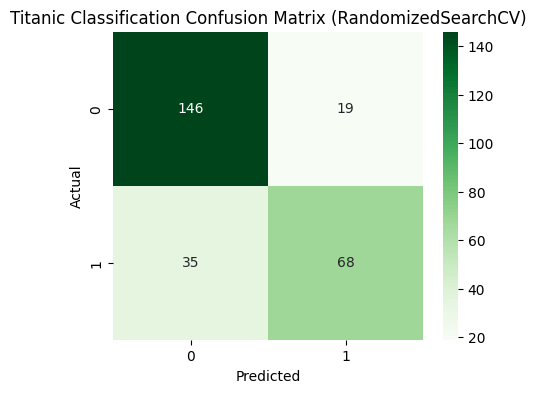
cm = confusion_matrix(y_test, y_pred)
plt.figure(figsize=(5,4))
sns.heatmap(cm, annot=True, fmt='d', cmap='Greens')
plt.title('Titanic Classification Confusion Matrix')
plt.xlabel('Predicted')
plt.ylabel('Actual')
plt.show()

# Feature importance
importances = rf_best.feature_importances_
indices = np.argsort(importances)[::-1]
plt.figure(figsize=(8,5))
plt.bar(range(X.shape[1]), importances[indices], align='center')
plt.xticks(range(X.shape[1]), [X.columns[i] for i in indices], rotation=45)
plt.title('Feature Importances (Titanic Random Forest)')
plt.tight_layout()
plt.show()

# Visualize tree with most important root split
root_feature = indices[0]
tree_idx = next((i for i, est in enumerate(rf_best.estimators_) if est.tree_.feature[0] == root_feature), 0)
plt.figure(figsize=(20,10))
plot_tree(rf_best.estimators_[tree_idx], feature_names=X.columns, filled=True, max_depth=2)
plt.title(f'Titanic Random Forest: Example Tree (Root={X.columns[root_feature]})')
plt.show()
Best parameters (RandomizedSearchCV): {‘n_estimators’: 200, ‘min_samples_split’: 2, ‘min_samples_leaf’: 1, ‘max_features’: ‘sqrt’, ‘max_depth’: 10} Best cross-validated accuracy (RandomizedSearchCV): 0.8378700606961477 Test Accuracy (RandomizedSearchCV): 0.7985074626865671












 RP’s Blog on AI
You must be logged in to post a comment.